🔐 Cryptography Workbench
Learn about cryptographic algorithms interactively
Welcome to the Cryptography Workbench
An interactive tool for exploring how modern cryptographic algorithms work. Experiment with real cryptographic operations, compare algorithms, and build intuition for the building blocks that secure the internet.
The Four Properties of Cryptographic Security
Cryptographic algorithms are used to construct security protocols that provide:
Confidentiality
Only authorized parties can read the data. Achieved through encryption (symmetric and asymmetric).
Integrity
Data has not been altered or corrupted. Achieved through hashing and MACs (HMAC, authenticated encryption).
Authenticity
The data and communicating parties are genuine. Achieved through digital signatures and certificates (PKI).
Non-repudiation
The sender cannot deny having sent the data. Achieved through digital signatures — only the private key holder can sign.
What you can do here
Each tab focuses on a different category of cryptographic operation:
🎲 Key Generation
Generate cryptographic keys for various algorithms. Understand security levels, entropy, and key size equivalence across algorithm families.
🔒 Symmetric Encryption
Encrypt and decrypt data with a shared secret key. Compare AES-GCM, AES-CTR, AES-CBC, and ChaCha20-Poly1305.
🔑 Asymmetric Encryption
Encrypt with a public key, decrypt with a private key. Explore RSA-OAEP and X25519 + ChaCha20-Poly1305.
🔢 Hashing
Compute cryptographic hashes and HMACs. See the avalanche effect, compare SHA-256, SHA-512, and BLAKE2b.
🔐 Password Hashing
Understand why password hashing is deliberately slow. Compare PBKDF2, bcrypt, scrypt, and Argon2id with adjustable parameters.
✍️ Digital Signatures
Sign messages and verify signatures. Explore RSA-PSS, ECDSA, and Ed25519. See how tampering is detected.
🤝 Key Exchange
Walk through a Diffie-Hellman key exchange step-by-step with Alice and Bob. See how a shared secret is established over an insecure channel.
📜 PKI
Simulate a certificate authority: create a root CA, issue certificates, verify trust chains, and revoke certificates.
🌐 TLS Handshake
Simulate a TLS 1.3 handshake — see how key exchange, signatures, hashing, and symmetric encryption combine to secure every HTTPS connection.
💬 Signal Protocol
Explore X3DH key agreement and the Double Ratchet — how Signal, WhatsApp, and others achieve forward secrecy for every message.
₿ Bitcoin
See how ECDSA signatures, double SHA-256, and Merkle trees secure transactions, addresses, and proof-of-work mining.
🛡️ Post-Quantum Cryptography
Understand the quantum threat, NIST's new ML-KEM and ML-DSA standards, lattice-based cryptography, and the transition timeline.
🔀 Shamir Secret Sharing
Split secrets into shares with a threshold — any k shares reconstruct the secret, but k-1 reveal nothing. Used in Vault/OpenBao unseal.
🔑 Key Derivation (HKDF)
The bridge between raw key material and usable keys. Extract entropy, expand with domain separation.
🔢 TOTP / HOTP
Generate the same one-time passwords as your authenticator app. Built entirely on HMAC-SHA1.
🎫 JSON Web Tokens
Create, decode, and verify JWTs. Understand the header.payload.signature structure and common attacks.
🌳 Merkle Trees
Build hash trees interactively. See how changing one leaf changes the root. Used in Git, Bitcoin, and CT logs.
🔮 Zero-Knowledge Proofs
Prove you know a secret without revealing it. Hash-based commitment scheme with the Ali Baba cave analogy.
How to use this workbench
- Each tab has an interactive controls section on the left where you perform operations, and a learning panel on the right with explanations, interactive demos, and links to authoritative sources.
- Look for the "Try this" hints below the action buttons — they suggest experiments that build intuition.
- Expand the collapsible sections in the learning panel to go deeper into how each algorithm works.
- The TLS Handshake tab ties everything together, showing how these primitives combine in practice.
Keyboard shortcuts
- Ctrl+K / Cmd+K — Clear all results on the current tab
- Ctrl+Shift+C / Cmd+Shift+C — Copy the current result to clipboard
📚 A Brief History
Cryptography is among the oldest information sciences — and one of the most consequential.
The Caesar cipher (c. 50 BC) shifted each letter by a fixed amount — one of the first known substitution ciphers. The Vigenere cipher (1553) used a repeating keyword to vary the shift, resisting simple frequency analysis for centuries.
These ciphers relied on the algorithm being secret. Modern cryptography inverts this: the algorithm is public, and only the key is secret (Kerckhoffs's principle, 1883).
The German Enigma machine used rotors and plugboards to create polyalphabetic substitution ciphers with astronomical key spaces. Breaking it at Bletchley Park — by Alan Turing, Gordon Welchman, and others — shortened the war by an estimated two years and laid the foundations of computer science.
The lesson: even seemingly unbreakable systems fall to mathematical insight combined with computational power.
1976 — Diffie-Hellman: Whitfield Diffie and Martin Hellman published "New Directions in Cryptography", introducing public-key cryptography and key exchange — the foundation of the Key Exchange tab.
1977 — RSA: Rivest, Shamir, and Adleman created the first practical public-key encryption system, still widely used today.
2001 — AES: After a public competition, NIST selected Rijndael as the Advanced Encryption Standard, replacing DES. AES remains the dominant symmetric cipher.
2005-present: Elliptic curve cryptography (ECC) matured, offering equivalent security with smaller keys. Daniel Bernstein's Curve25519 (2005) and Ed25519 (2011) became preferred for their simplicity and resistance to implementation errors. TLS 1.3 (2018) mandated forward secrecy and removed legacy algorithms.
Modern cryptography secures nearly every digital interaction:
- HTTPS / TLS: Encrypts all web traffic (key exchange + symmetric encryption + signatures)
- End-to-end messaging: Signal, WhatsApp, iMessage use X25519 + AES/ChaCha20
- Password storage: bcrypt, scrypt, Argon2id protect credentials at rest
- Software supply chain: Code signing, package checksums, certificate transparency
- Digital currencies: ECDSA signatures and SHA-256 hashing underpin Bitcoin and Ethereum
The next frontier is post-quantum cryptography — new algorithms (like ML-KEM / Kyber, ML-DSA / Dilithium) designed to resist quantum computers running Shor's algorithm. NIST finalized the first PQC standards in 2024.
Most cryptographic vulnerabilities come from misuse of correct algorithms, not from breaking the math:
- Using ECB mode: Identical plaintext blocks produce identical ciphertext, leaking patterns (see the penguin example in the Symmetric tab)
- IV/nonce reuse: Reusing an IV with AES-GCM leaks the authentication key. Reusing a counter with AES-CTR produces a two-time pad.
- Using Math.random() for keys: Not cryptographically secure. Use
crypto.getRandomValues()or equivalent CSPRNG. - Rolling your own crypto: Custom algorithms and protocols almost always have flaws. Use well-tested, peer-reviewed libraries.
- Hardcoded keys/secrets: Keys in source code end up in version control, build artifacts, and logs.
- Confusing encoding with encryption: Base64 and hex are encodings — they provide zero security. Anyone can decode them.
- Using SHA-256(password + salt) for password storage: Fast hashes allow billions of guesses per second. Use bcrypt, scrypt, or Argon2id.
- System-wide salts: Every credential needs a unique salt, not a shared one (CWE-760).
- Insufficient key sizes: RSA-1024 is broken. AES-128 is still considered secure, but AES-256 is recommended for stronger security margins and post-quantum resilience. RSA needs 2048+ bits (3072+ recommended) for equivalent security.
- Not validating certificates: Disabling TLS certificate verification (
verify=False) defeats the entire purpose of TLS.
- Use established libraries: OpenSSL, libsodium, Web Crypto API, BouncyCastle. Never implement primitives yourself.
- Prefer authenticated encryption: AES-GCM or ChaCha20-Poly1305. Unauthenticated modes (CTR, CBC) require separate integrity checks.
- Generate fresh IVs/nonces for every operation: Use CSPRNG output. Never reuse, never derive from predictable values.
- Use appropriate key sizes: AES-256, RSA-3072+, ECDSA P-256+, Ed25519. Match security levels across algorithm families.
- Separate keys by purpose: Don't use the same key for encryption and signing. Don't use KEKs for data encryption.
- Rotate keys periodically: Limits exposure from undetected compromise and reduces the amount of data encrypted under a single key.
- Use constant-time comparison: For HMAC verification, password hash comparison, and signature checks. Prevents timing side-channel attacks.
- Store passwords with Argon2id: Or bcrypt (cost 10+), or PBKDF2 (600K+ iterations with SHA-256). Use per-credential salts of 32+ bytes.
- Plan for algorithm agility: Design systems so algorithms can be upgraded without re-architecting. The PQC transition is coming.
- Validate all certificates: Never disable TLS verification. Pin certificates or use certificate transparency where appropriate.
A common misconception: encoding (Base64, hex, URL encoding) transforms data into a different representation but provides zero confidentiality. Anyone can decode it — no key is needed.
| Encoding | Encryption | |
|---|---|---|
| Purpose | Format conversion | Confidentiality |
| Key required? | No | Yes |
| Reversible by anyone? | Yes | No (key holder only) |
| Example | btoa("secret") = "c2VjcmV0" | AES-GCM(key, "secret") = random-looking bytes |
Storing passwords as Base64 (CWE-261) or transmitting secrets as hex in URLs provides no protection. If you can decode it without a key, so can an attacker.
Further Reading
- Applied Cryptography — Bruce Schneier
- Cryptopals Challenges — learn by breaking crypto
- NIST CSRC — standards and guidelines
- Wikipedia: History of Cryptography
- Stanford Cryptography I — Dan Boneh (free course)
Key Generation
📚 Key Generation
Cryptographic keys must be generated from a cryptographically secure pseudorandom number generator (CSPRNG). Browser environments use crypto.getRandomValues(), which draws entropy from the OS kernel.
Keys are the foundation of every operation in this workbench. Generate a key here, then use it in the other tabs to encrypt, sign, or exchange data.
Different algorithm families need different key sizes to achieve the same security level. "128-bit security" means an attacker needs ~2128 operations to break it.
| Security | Symmetric | RSA | ECC |
|---|---|---|---|
| 80 bits | — | 1024 | 160 |
| 112 bits | 3DES (112) | 2048 | 224 |
| 128 bits | AES-128 | 3072 | 256 (P-256) |
| 192 bits | AES-192 | 7680 | 384 (P-384) |
| 256 bits | AES-256 | 15360 | 521 (P-521) |
Source: keylength.com (NIST recommendations)
Entropy measures unpredictability. A 256-bit key generated from a CSPRNG has 256 bits of entropy. A key derived from the password "password123" has far less — perhaps 20 bits.
Never use Math.random() for cryptography — it is not cryptographically secure. Always use crypto.getRandomValues() or libsodium's randombytes_buf().
Common mistake: Using a timestamp or counter as a "random" value. These are predictable and provide zero cryptographic security.
Keys generated in this demo exist only in browser memory and are lost on page refresh. In production:
- Browser: Use the Web Crypto wrapKey/unwrapKey API or IndexedDB with non-extractable keys
- Server: Use HSMs, key vaults (AWS KMS, HashiCorp Vault), or encrypted key files
- Never: Store keys in plaintext, in source code, or in environment variables without encryption
Keys must be managed through their entire lifecycle (based on NIST SP 800-57):
- Key Generation: Secure, high-entropy creation using a CSPRNG. Ensure keys are unpredictable and robust.
- Key Derivation: KDFs generate encryption keys from passwords or existing keys (e.g., PBKDF2, HKDF).
- Key Registration: Bind key to its owner/application and verify authenticity. Establishes the trust relationship.
- Key Storage: Safeguard against unauthorized access using key wrapping, HSMs, or vault systems. Never store keys in plaintext.
- Key Distribution: Securely transfer keys to intended users/systems while minimizing exposure to interception.
- Key Usage: Use keys only for their intended purpose (encryption, signing, etc.).
- Key Rotation: Periodically change keys to limit the amount of data encrypted with a single key and reduce compromise risk.
- Key Backup & Recovery: Ensure keys can be securely recovered in cases of loss to maintain access to encrypted data.
- Key Revocation: Remove or disable keys that are no longer safe due to compromise or as routine lifecycle management.
- End-of-Life Destruction: Securely delete keys when no longer needed to prevent unauthorized recovery.
Cross-cutting concerns that apply throughout: Access Control (restrict who can use or manage keys based on roles), Audit Logging (track all key usage for compliance and forensics).
Key wrapping encrypts keys with other keys, creating a hierarchy:
- Key Encryption Key (KEK): Used exclusively to encrypt other keys. Stored in an HSM or vault system.
- Data Encryption Key (DEK): Used to encrypt actual data. Wrapped (encrypted) by the KEK for storage.
This separation means compromising the database (where wrapped DEKs are stored) doesn't expose the keys — the attacker also needs the KEK from the HSM.
Key isolation — keeping cryptographic operations separate from application logic:
- HSMs (Hardware Security Modules): Dedicated tamper-resistant hardware that generates keys and performs crypto operations internally. Keys never leave the device.
- TPMs (Trusted Platform Modules): Chip on the motherboard for platform integrity and key storage.
- Secure enclaves: Intel SGX, ARM TrustZone — isolated execution environments within the CPU.
- Vault systems: HashiCorp Vault / OpenBao, AWS KMS, Azure Key Vault, Google Cloud KMS — centralized key management with API-driven encryption/decryption, automatic key rotation, fine-grained access policies, comprehensive audit logging, and Shamir Secret Sharing for unseal operations. The vault performs crypto operations on behalf of applications so keys never leave the vault boundary.
Learn More
- NIST SP 800-57 — Key Management recommendations
- keylength.com — Key length comparison tool
- MDN getRandomValues()
- libsodium docs — Random data generation
Symmetric Encryption
Paste ciphertext, key, and IV to decrypt data from external sources. For AEAD algorithms (AES-GCM, ChaCha20-Poly1305), the ciphertext includes the authentication tag.
📚 Symmetric Encryption
Symmetric encryption uses the same secret key to both encrypt and decrypt data. It is fast, efficient, and the workhorse of modern cryptography — used to protect data at rest and in transit.
Block Ciphers
Operate on fixed-length chunks (blocks) of data, typically 128 bits (16 bytes).
- AES (Advanced Encryption Standard), originally known as Rijndael, is the most common modern block cipher. Submitted to the NIST competition in 1998, it was standardized as FIPS 197 in 2001. AES is based on a substitution-permutation network (SPN) — each round applies byte substitution (S-box), row shifting, column mixing, and key addition.
- DES (derived from IBM's Lucifer cipher, adopted as FIPS 46 in 1977) and 3DES (standardized as FIPS 46-3 in 1999) are obsolete block cipher algorithms. DES uses a 56-bit key, which is trivially brutable today.
Block ciphers require a mode of operation (ECB, CBC, CTR, GCM) to handle data larger than one block. The mode determines how blocks are chained together — see "Modes of Operation" below.
Stream Ciphers
Operate on data one bit (or byte) at a time by XORing with a pseudorandom keystream.
- ChaCha20 (published 2008) is a modern stream cipher from the ChaCha family, based on Salsa20 (designed 2005). It uses ARX operations — modular Addition, fixed-amount Rotation, and XOR — which are constant-time on all platforms, avoiding timing side-channel attacks.
- ChaCha20-Poly1305 combines the ChaCha20 stream cipher with the Poly1305 MAC for authenticated encryption. Used in TLS 1.3, WireGuard, and Signal.
- RC4 (designed 1987) is an obsolete stream cipher with multiple known vulnerabilities. It was removed from TLS in 2015 (RFC 7465).
Note: AES in CTR or GCM mode effectively turns the block cipher into a stream cipher by encrypting sequential counter values to generate a keystream.
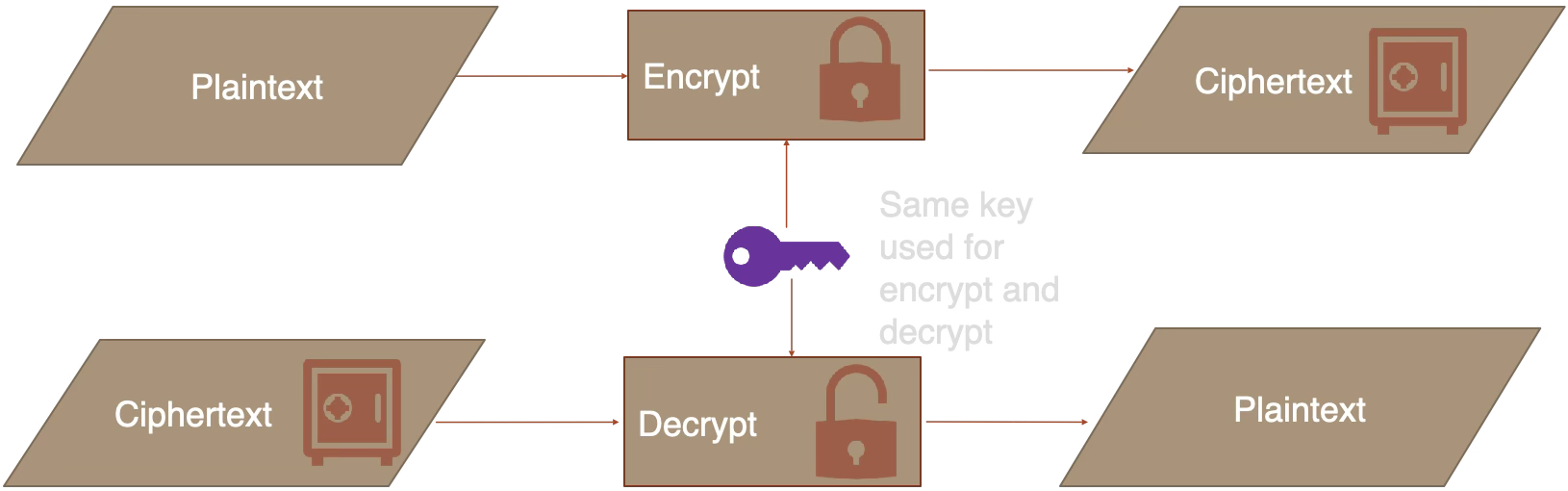
The same secret key is used for both encryption and decryption. The key must be shared securely between parties — if an attacker obtains it, they can decrypt everything.
GCM (Galois/Counter Mode) is an authenticated mode: it encrypts data and produces an authentication tag that detects tampering. This is the recommended default.
CTR (Counter Mode) provides confidentiality only — no integrity check. An attacker can flip bits in the ciphertext without detection.
CBC (Cipher Block Chaining) is a legacy mode vulnerable to padding oracle attacks if not combined with a MAC.
ECB (Electronic Codebook) encrypts each block independently with the same key. Identical plaintext blocks produce identical ciphertext blocks, leaking patterns:
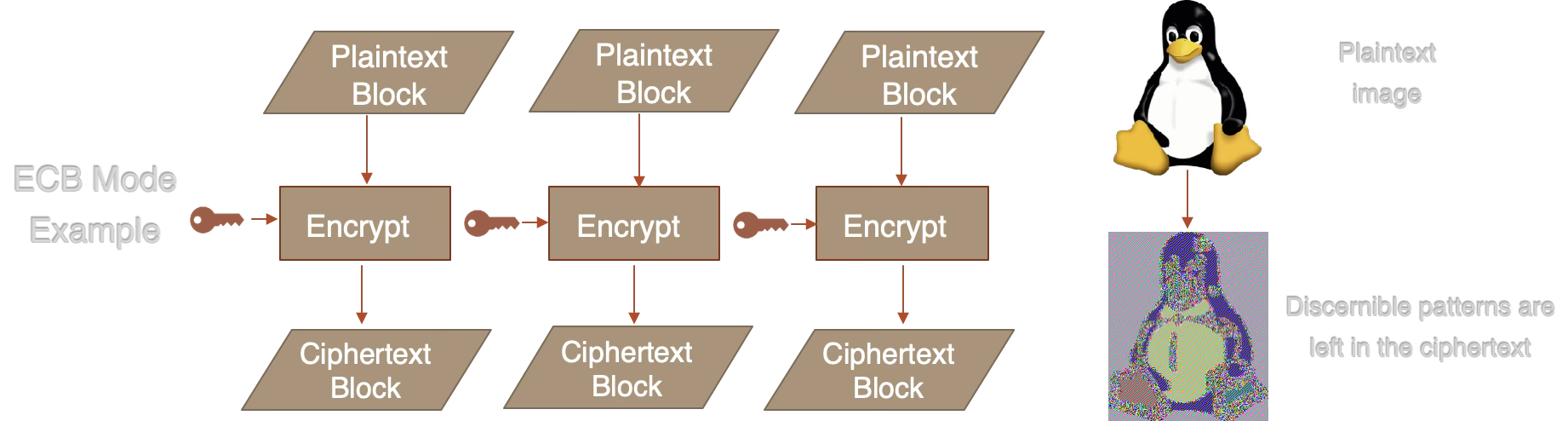
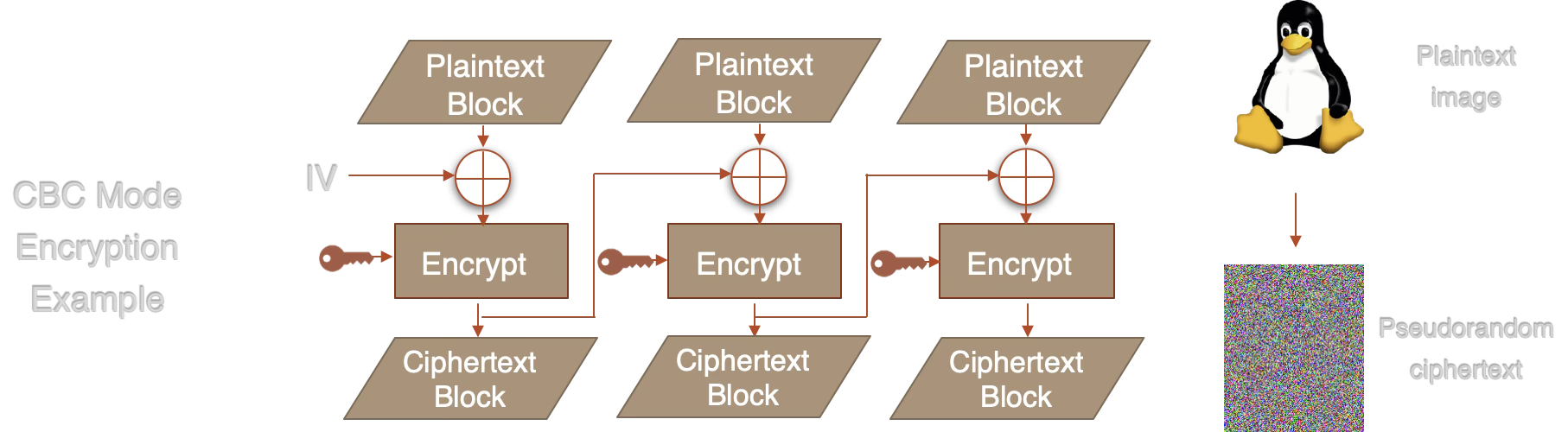
CBC fixes this by XORing each plaintext block with the previous ciphertext block before encryption. The IV randomizes the first block:
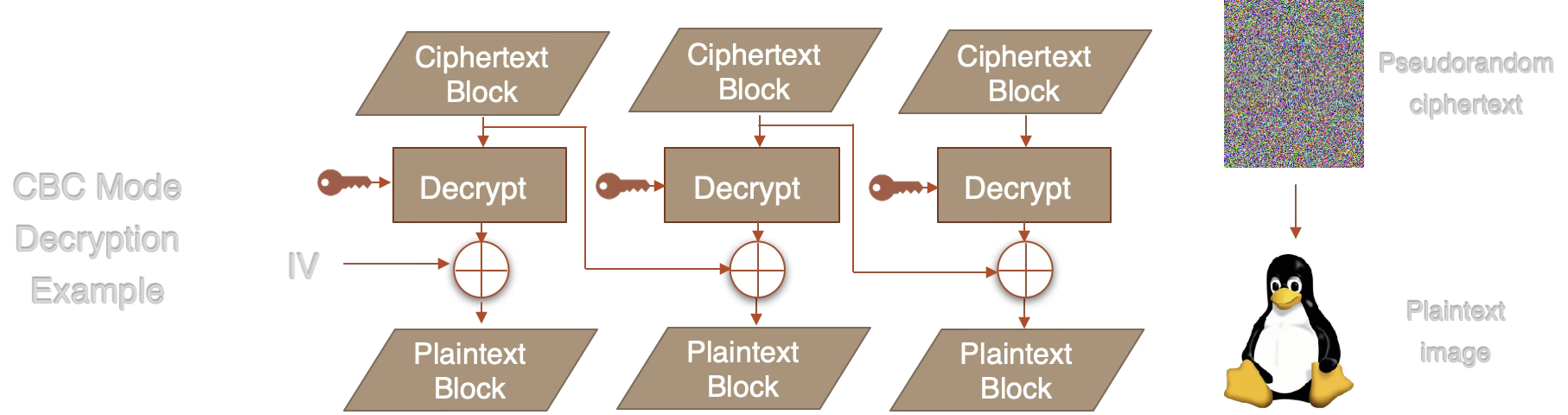
CBC decryption reverses the process — each decrypted block is XORed with the previous ciphertext block:
Rule of thumb: Always prefer authenticated encryption (GCM or ChaCha20-Poly1305). CBC requires a separate MAC (e.g., HMAC) to provide integrity, and is vulnerable to padding oracle attacks if implemented incorrectly.
An Initialization Vector (IV) or nonce ensures that encrypting the same plaintext with the same key produces different ciphertext each time. Reusing an IV with the same key can catastrophically break security:
- AES-GCM: IV reuse leaks the authentication key, allowing forgery
- AES-CTR: IV reuse produces a two-time pad, revealing plaintext via XOR
AES operates on fixed 128-bit (16-byte) blocks. In GCM mode:
- Counter mode (CTR) generates a keystream by encrypting sequential counter values (IV + counter). The plaintext is XORed with this keystream — turning the block cipher into a stream cipher.
- GHASH computes an authentication tag over the ciphertext using polynomial multiplication in GF(2128). This tag detects any tampering with the ciphertext or associated data.
The result is ciphertext (same length as plaintext) + a 16-byte authentication tag. The tag is checked during decryption — if it doesn't match, decryption is rejected entirely.
Key sizes: AES-128 uses 10 rounds, AES-192 uses 12 rounds, AES-256 uses 14 rounds. The performance difference is minimal (~15%), so AES-256 is commonly preferred for its larger security margin.
- TLS 1.3: AES-128-GCM and AES-256-GCM are the primary ciphers for HTTPS traffic
- Disk encryption: BitLocker (AES-XTS), FileVault (AES-XTS), LUKS (AES-XTS)
- WireGuard VPN: ChaCha20-Poly1305 (chosen for speed without hardware AES-NI)
- Signal / WhatsApp: AES-256-CBC with HMAC-SHA256 (older) or ChaCha20-Poly1305
- AWS S3 / GCS: Server-side encryption with AES-256-GCM
Learn More
- NIST SP 800-38D — GCM specification
- MDN SubtleCrypto.encrypt()
- OWASP Cryptographic Storage
- RFC 8439 — ChaCha20-Poly1305
Asymmetric Encryption
Paste PEM-formatted RSA keys (from OpenSSL, etc.).
Paste ciphertext to decrypt with the current private key. For X25519, also provide the nonce.
📚 Asymmetric Encryption
Asymmetric (public-key) encryption uses a pair of keys: a public key anyone can use to encrypt, and a private key only the owner can use to decrypt. This solves the key distribution problem — you can publish your public key openly.
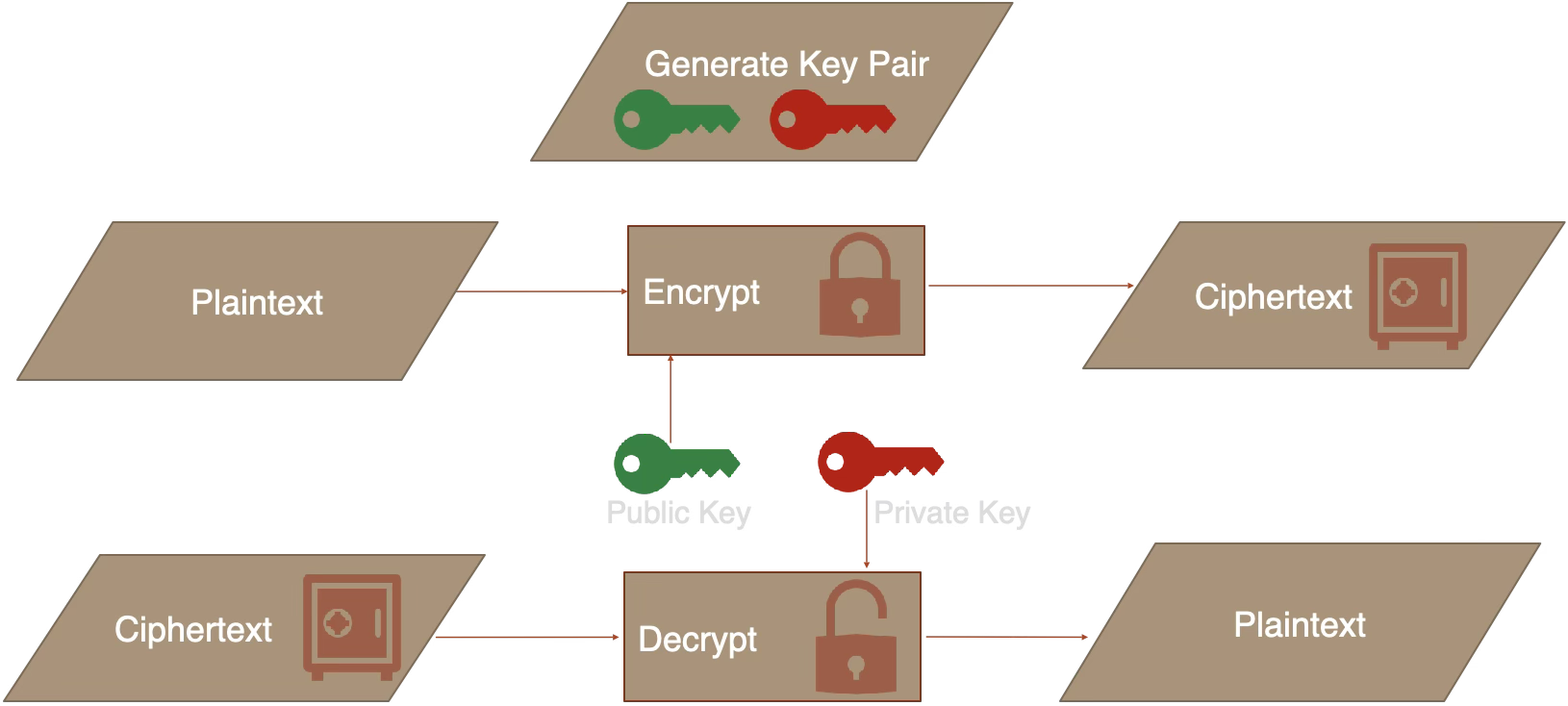
The sender encrypts with the recipient's public key. Only the recipient's private key can decrypt. The public key can be shared openly — the private key never leaves the recipient.
RSA can only encrypt messages shorter than its key size (e.g., ~190 bytes for RSA-2048 with OWASP + SHA-256). For larger data, real-world systems use hybrid encryption:
Hybrid Encryption:
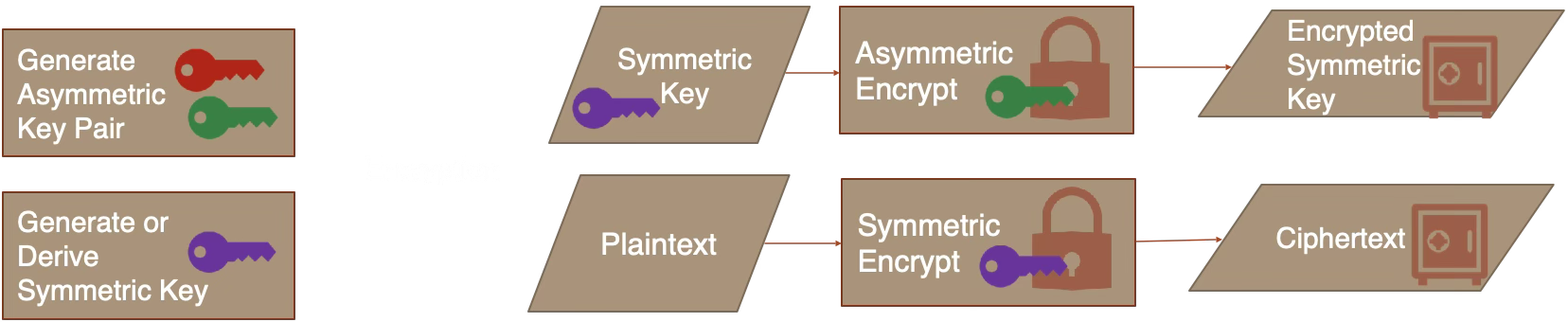
Hybrid Decryption:
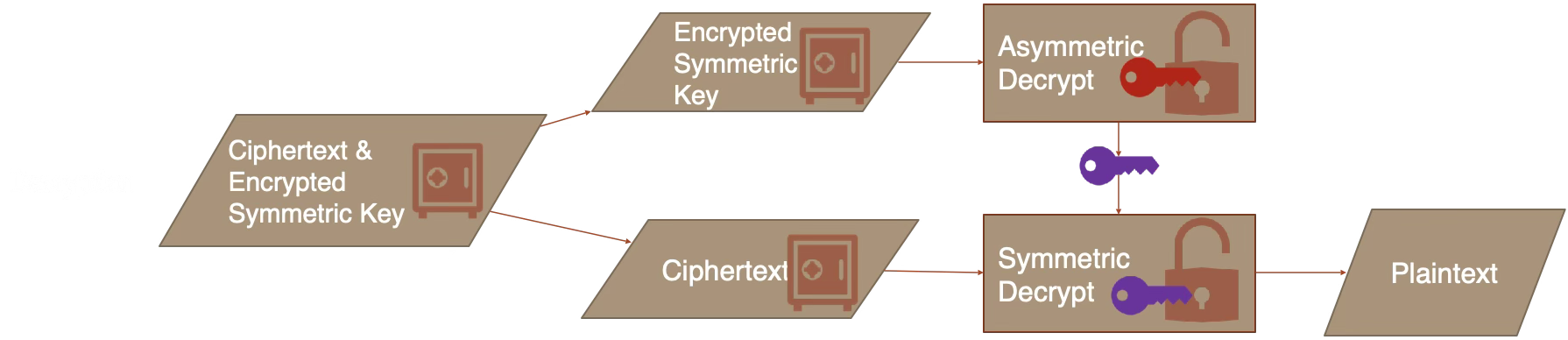
TLS, PGP, and Signal all use this pattern. X25519 + ChaCha20-Poly1305 (libsodium's "box" construction) does this automatically.
In practice, a secure message from Alice to Bob combines hashing, signing, symmetric encryption, and asymmetric encryption together:
Encrypt + Sign (Alice sends to Bob):
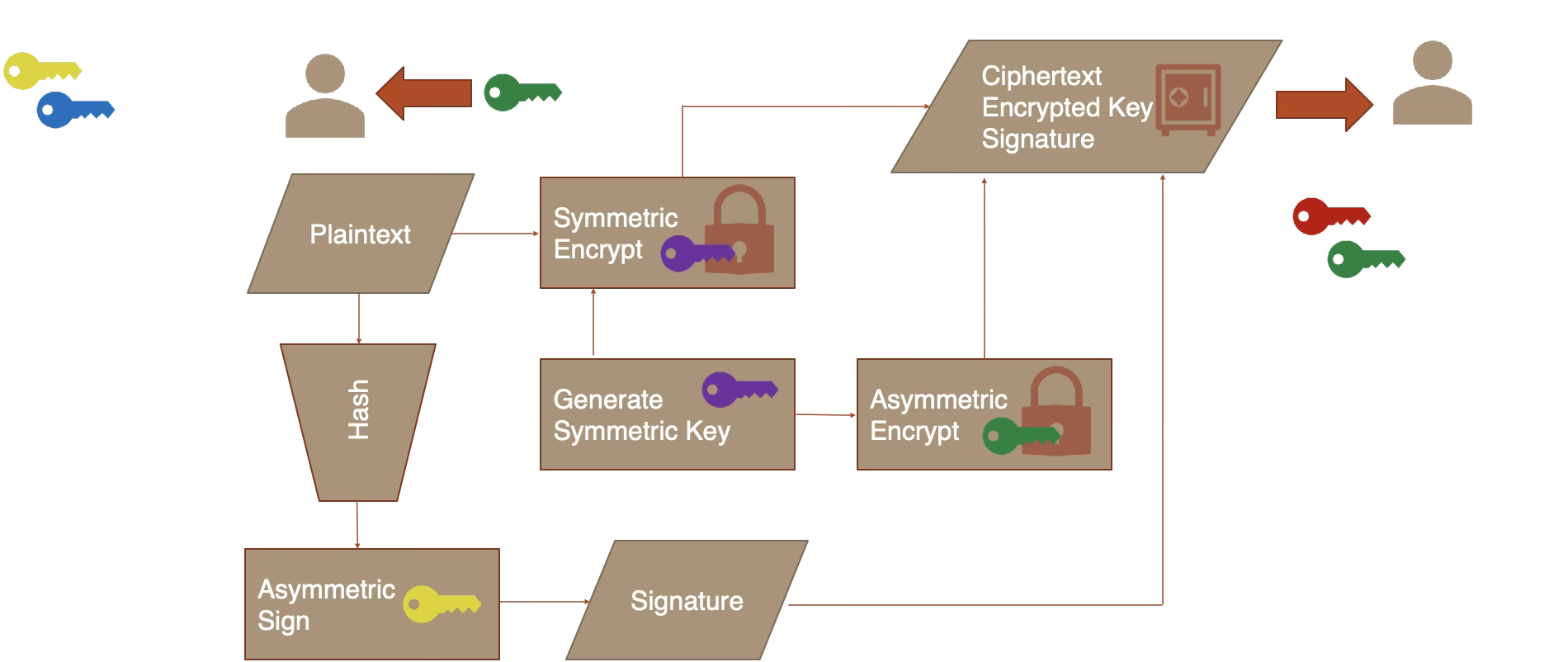
Alice generates a random symmetric key, encrypts the plaintext, encrypts the symmetric key with Bob's public key, and signs the hash of the plaintext with her private key. She sends the ciphertext, encrypted key, and signature to Bob.
Decrypt + Verify (Bob receives from Alice):
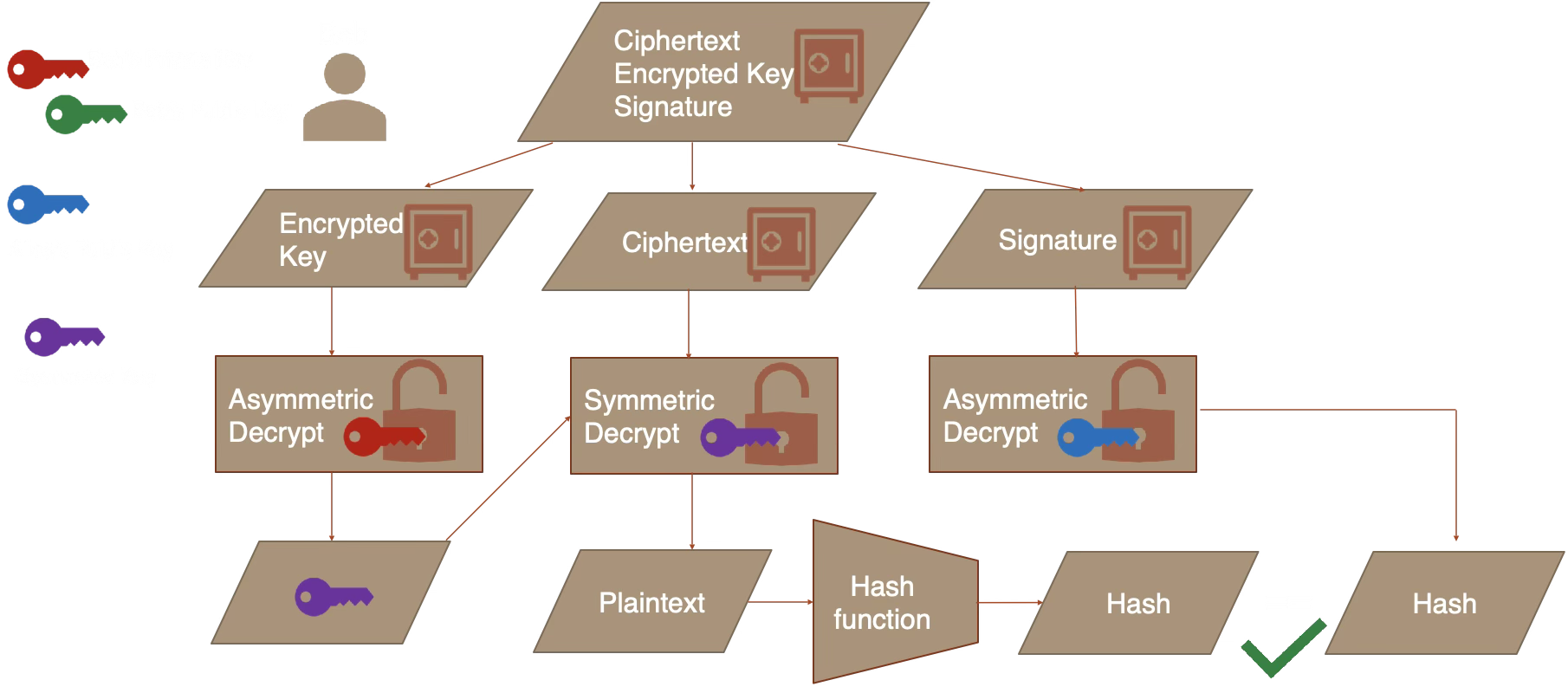
Bob uses his private key to recover the symmetric key, decrypts the ciphertext, hashes the recovered plaintext, and verifies the signature using Alice's public key. If the hashes match, both authenticity and integrity are confirmed.
OAEP (Optimal Asymmetric Encryption Padding) adds randomized padding before RSA encryption. Without it, RSA is deterministic — the same plaintext always produces the same ciphertext, enabling chosen-plaintext attacks.
PKCS#1 v1.5 padding (the older scheme) is vulnerable to Bleichenbacher's attack. Always use OAEP.
| RSA-2048 | X25519 | |
|---|---|---|
| Security level | ~112 bits | ~128 bits |
| Public key size | 256 bytes | 32 bytes |
| Key generation | Slow (primes) | Fast |
| Encryption speed | Moderate | Fast |
Learn More
- RFC 8017 — PKCS#1 (RSA-OAEP)
- MDN SubtleCrypto.generateKey()
- cr.yp.to/ecdh — Curve25519 design
- libsodium docs — Authenticated box
Cryptographic Hashing
📚 Cryptographic Hashing
A hash function maps arbitrary-length input to a fixed-length output (the "digest"). It is one-way (cannot be reversed), deterministic (same input = same output), and collision-resistant (hard to find two inputs with the same hash).
Preimage resistance: Given a hash value h, it should be computationally infeasible to find any input x such that Hash(x) = h. An ideal 256-bit hash has 256-bit security against preimage attacks.
Second preimage resistance: Given an input x1, it should be infeasible to find a different input x2 such that Hash(x1) = Hash(x2). This ensures you can't substitute a different document with the same hash.
Collision resistance: It should be infeasible to find any two distinct inputs that hash to the same value. Due to the birthday problem, a 256-bit hash offers only ~128-bit collision security — a collision becomes likely (>50%) after ~2128 hashes, not 2256.
The birthday bound is why hash output size matters: SHA-256 (256 bits) provides ~128-bit collision security, SHA-512 provides ~256-bit. The pigeonhole principle guarantees collisions must exist (infinite inputs, finite outputs), but finding one should be computationally impractical.
Restricted preimage space: Note that preimage resistance assumes the input space is large. An 8-character password from 70 possible characters has only ~576 billion possibilities (~49 bits of entropy) — easily brutable even at SHA-256's slower speeds. This is why password hashing uses slow algorithms, not fast hashes.
Changing even a single bit of the input should change roughly half the bits of the output. This property makes it impossible to learn anything about the input from the hash.
Compare algorithms:
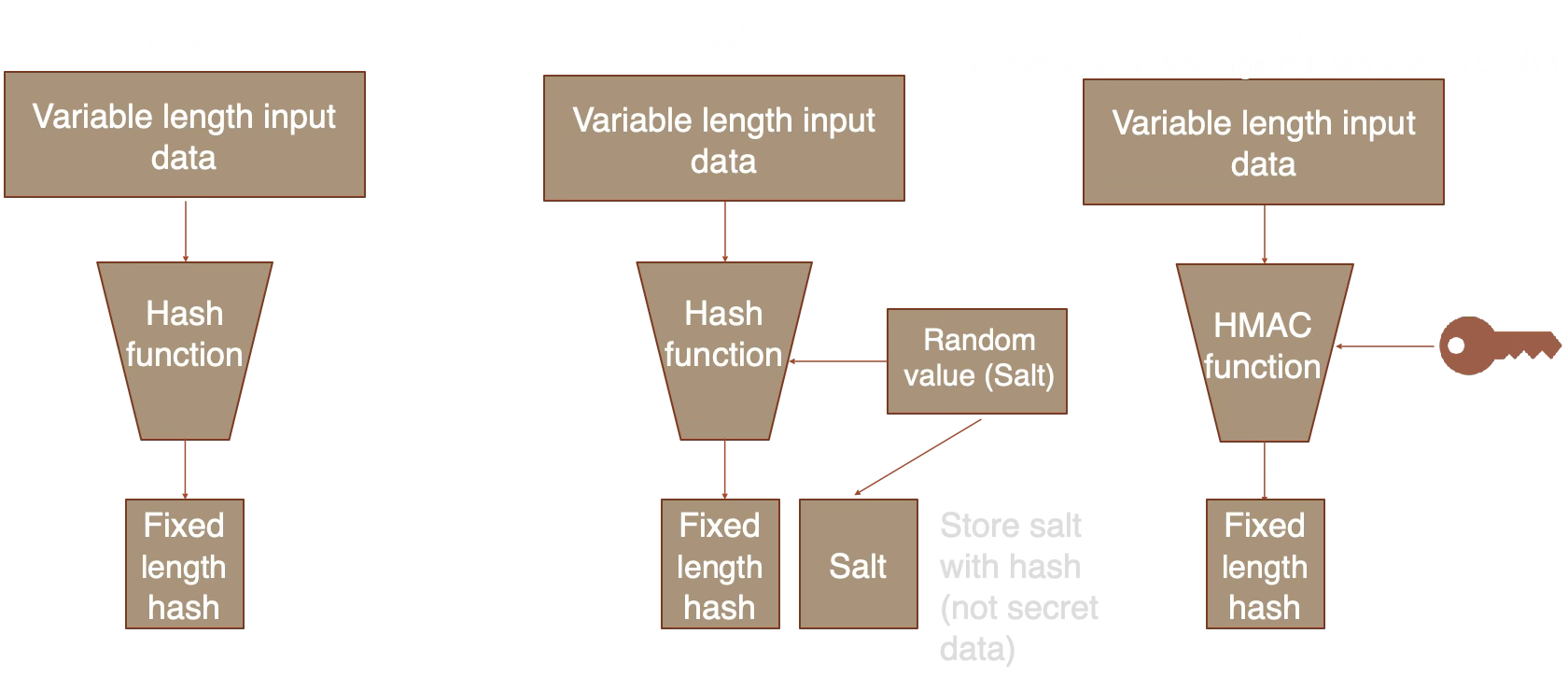
Plain hash: anyone can compute. Salted hash: prevents rainbow tables. HMAC: requires a secret key, proving both integrity and authenticity.
Plain hash: anyone can compute. Salted hash: prevents rainbow tables. HMAC: requires a secret key, proving both integrity and authenticity.
Hash (e.g., SHA-256): Anyone can compute it. Used for integrity checks, fingerprints, and content addressing.
HMAC (Hash-based Message Authentication Code): Requires a secret key. Proves both integrity and authenticity — only someone with the key can produce or verify the tag.
Use cases: API request signing (HMAC-SHA256), JWT tokens, webhook verification (e.g., GitHub, Stripe).
In 2017, Google's SHAttered project demonstrated the first practical SHA-1 collision — two different PDFs with the same SHA-1 hash. Generating a collision cost ~$110,000 in compute and has dropped since.
SHA-1 should not be used for security purposes. It remains available here for educational comparison only.
SHA-256 uses the Merkle-Damgard construction:
- Padding: The message is padded to a multiple of 512 bits (64 bytes), with its original length appended.
- Chunking: The padded message is split into 512-bit blocks.
- Compression: Each block is processed through a compression function that combines it with the current hash state (8 x 32-bit words) using 64 rounds of bitwise operations, additions, and rotations.
- Output: The final 256-bit state is the hash digest.
SHA-512 works identically but uses 1024-bit blocks, 80 rounds, and 64-bit words — producing a 512-bit digest. On 64-bit CPUs, SHA-512 can actually be faster than SHA-256 because it uses native 64-bit arithmetic.
- Git: Commit IDs are SHA-1 hashes (migrating to SHA-256)
- Bitcoin: Double SHA-256 for block hashing and proof-of-work
- Package managers: npm, pip, apt verify downloads via SHA-256 checksums
- Content addressing: IPFS, Docker image layers, deduplication systems
- TLS certificates: Signed with SHA-256 (SHA-1 certificates deprecated since 2017)
- HMAC-SHA256: API authentication (AWS Signature V4, Stripe webhooks, GitHub webhooks)
Learn More
- NIST FIPS 180-4 — SHA-2 specification
- NIST SP 800-107 — HMAC guidance
- blake2.net — BLAKE2 specification
- SHAttered — SHA-1 collision demo
Password Hashing
📚 Password Hashing
Password hashing is deliberately slow. Unlike regular hashing (fast by design), password hashing functions are tuned to take hundreds of milliseconds per hash — making brute-force attacks against stolen password databases impractical.
A salt is random data mixed into the hash input. Without it, identical passwords produce identical hashes, enabling rainbow table attacks — precomputed lookup tables of common password hashes.
With a unique salt per user, an attacker must brute-force each password individually, even if two users chose the same password.
PBKDF2 is CPU-hard only — it can be massively parallelized on GPUs (thousands of cores). An attacker with a GPU cluster can test billions of passwords per second.
scrypt and Argon2id are memory-hard: each hash requires a large block of RAM (64MB-1GB). GPUs have limited memory per core, so parallelism is constrained by memory bandwidth, not compute.
Recommendation: Use Argon2id if available, PBKDF2 with 600,000+ iterations as a fallback (OWASP 2023).
Argon2id is a hybrid of two modes:
- Argon2i (data-independent): Memory access patterns don't depend on the password. Resistant to side-channel attacks (timing/cache) but weaker against GPU brute-force.
- Argon2d (data-dependent): Memory access depends on the password. Stronger against GPU attacks but vulnerable to side-channel leaks.
Argon2id combines both: the first half of each pass uses Argon2i (side-channel safe), the second half uses Argon2d (GPU-resistant). This gives the best of both worlds.
Parameters explained:
- Time cost (opslimit): Number of passes over memory. More passes = slower = more secure. OWASP suggests 3 for interactive logins.
- Memory cost (memlimit): RAM required per hash. Higher memory makes GPU/ASIC attacks expensive. 256MB is the "moderate" default.
- Parallelism: Number of threads (fixed at 1 in browser). Server-side implementations use 2-4 threads.
Real-world hashcat benchmarks on 2x NVIDIA RTX 3090 GPUs show why algorithm choice matters:
| Algorithm | Speed | 8-char password |
|---|---|---|
| MD5 | 138 GH/s | ~24 seconds |
| NTLM | 249 GH/s | ~13 seconds |
| SHA-256 | 18.7 GH/s | ~3 minutes |
| SHA-512 | 5.5 GH/s | ~10 minutes |
| WPA2 (PBKDF2, 4095 iter) | 2.2 MH/s | ~17 days |
| bcrypt (cost 10) | ~5 kH/s | ~21 years |
| Argon2id | ~1 kH/s | ~105 years |
Times assume 8-character random password from 95 printable ASCII characters (958 ≈ 6.6 trillion combinations, average 50% of keyspace). RTX 4090 is roughly 2x faster. An attacker with a GPU cluster can try billions of fast hashes per second — but only thousands of bcrypt/Argon2id hashes per second. This is why password-specific algorithms exist.
A defense-in-depth approach to password storage:
Step 3 (encrypting the hash) adds a layer of defense: even if an attacker steals the password hashes (via SQL injection for example), they still need the encryption key (stored separately, e.g., in an HSM or environment variable) to attempt cracking.
- CWE-261: Weak encoding for passwords (e.g., Base64 is not encryption)
- CWE-760: Using a system-wide salt instead of per-credential salt
- CWE-916: Insufficient computational cost (too few iterations/low cost factor)
Do not:
- Store passwords in plaintext or trivial encoding
- Use fast hashes like
sha256(password + salt)— use a proper KDF - Hard-code passwords in application code
- Use system-wide salts — each credential needs a unique salt
Consider: Using a trusted Identity Provider (SAML2, OpenID Connect SSO) instead of storing credential hashes directly. This delegates password management to a system designed for it.
Learn More
- OWASP Password Storage — current best practices
- Password Hashing Competition — Argon2 won in 2015
- RFC 9106 — Argon2 specification
- RFC 8018 — PBKDF2 specification
- NIST SP 800-63B — Digital Identity Guidelines
- CyberChef — encode/decode/hash tool
- CrackStation — hash lookup (shows why fast hashes are broken)
- Password Cracking Details — in-depth analysis of password cracking speeds
Digital Signatures
Paste PEM-formatted keys. Private key is needed to sign, public key to verify.
Paste a signature (Base64 or Hex) and the original message to verify against the current public key.
📚 Digital Signatures
A digital signature proves three things: authentication (who sent it), integrity (it wasn't altered), and non-repudiation (the signer can't deny signing). Only the private key holder can sign, but anyone with the public key can verify.
| Encryption | Signing | |
|---|---|---|
| Purpose | Confidentiality | Authenticity |
| Encrypt/Sign with | Public key | Private key |
| Decrypt/Verify with | Private key | Public key |
| Message visible? | No (encrypted) | Yes (plaintext + signature) |
A signature is bound to the exact message content. Changing even a single character makes the signature invalid.
Try it: Use the main panel to sign a message, then change one character in the message text and click "Verify Signature" — it will fail.
Ed25519 is deterministic: signing the same message with the same key always produces the same signature. This eliminates an entire class of bugs — a bad random number generator during ECDSA signing leaked Sony's PS3 private key in 2010.
RSA-PSS and ECDSA are randomized: each signature differs even for the same message. This is safe when the RNG works correctly, but fragile if it doesn't.
RSA signing is the "reverse" of encryption. Given key pair (e, d, N):
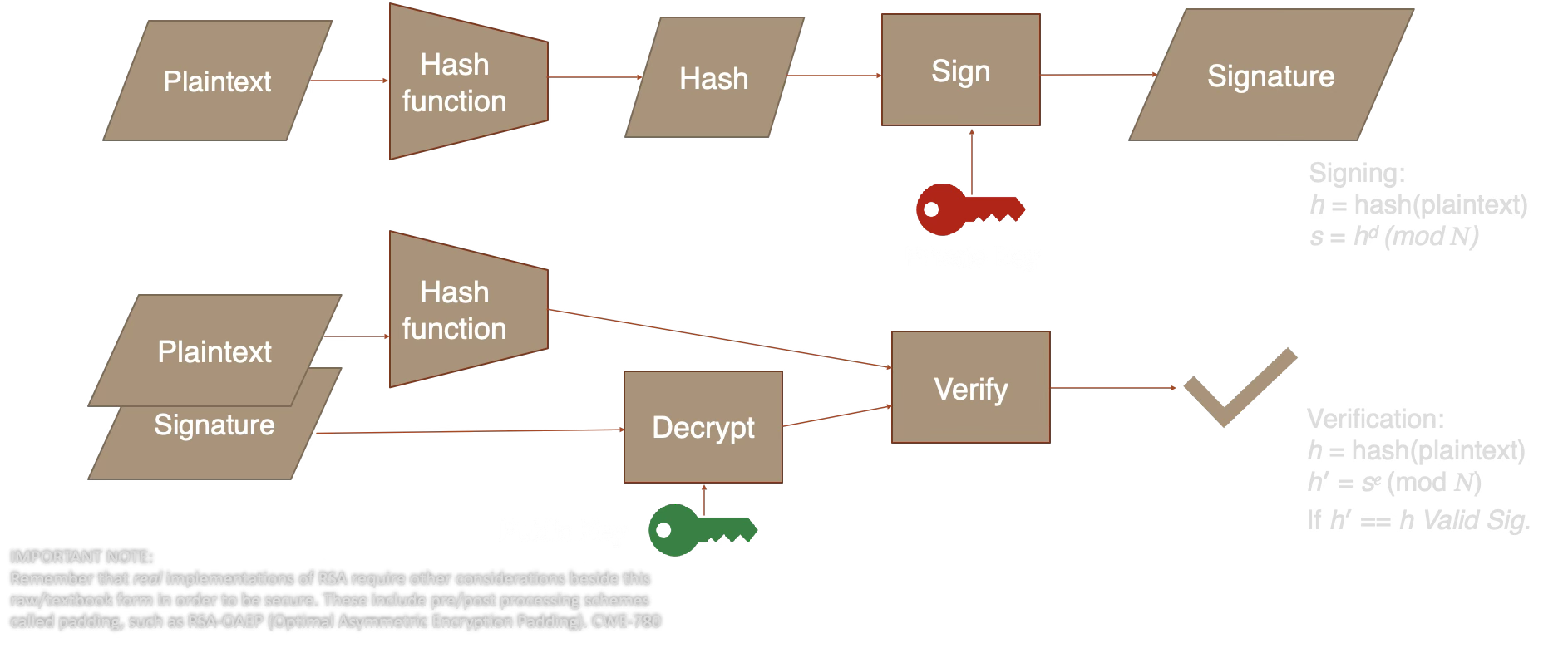
- Hash the message: h = SHA-256(message)
- Sign: signature = hd mod N (using the private key d)
- Verify: h' = signaturee mod N (using the public key e), then check h' == SHA-256(message)
PSS padding (Probabilistic Signature Scheme) adds a random salt before signing. This means the same message produces different signatures each time, which provides a stronger security proof than the older PKCS#1 v1.5 scheme. Real implementations of RSA require padding schemes like RSA-OAEP to be secure (CWE-780).
ECDSA works differently: it uses a random nonce k to compute a point on the elliptic curve, then derives the signature (r, s) from that point and the private key. If k is ever reused or predictable, the private key can be recovered — this is exactly what happened in the 2010 PS3 key leak. Ed25519 avoids this by deriving the nonce deterministically from the private key and message.
ECDSA and EdDSA provide digital signatures using elliptic curves.
ECDSA Signing
- Hash the plaintext:
h = SHA-256(plaintext) - Generate random number k in range [1, n-1]
- Calculate k * G (generator point), take x-coordinate as r
- Calculate signature proof:
s = k-1 * (h + r * privateKey) (mod n) - Signature is (r, s)
ECDSA Verification
- Hash the plaintext:
h = SHA-256(plaintext) - Confirm r and s are in range [1, n-1]
- Calculate modular inverse:
s1 = s-1 (mod n) - Recover point:
R' = (h * s1) * G + (r * s1) * publicKey - Take x-coordinate as r'. If r' == r, the signature is valid.
EdDSA Differences
- Uses twisted Edwards curves (Ed25519 uses Curve25519 in Edwards form)
- Generates the nonce deterministically from a hash of the private key and plaintext, eliminating RNG vulnerabilities
- ECDSA is used in TLS; EdDSA (Ed25519) is used in Signal Protocol, SSH, and is preferred for its efficiency and implementation safety
- TLS certificates: Your browser verifies server identity via certificate chains signed by CAs
- Git commits:
git commit -Screates GPG/SSH-signed commits - Software packages: npm, apt, Docker images are all signed
- JWT tokens: RS256/ES256/EdDSA signed claims
- Blockchain: Every transaction is signed by the sender's private key
Learn More
- NIST FIPS 186-5 — Digital Signature Standard
- RFC 8032 — EdDSA (Ed25519)
- MDN SubtleCrypto.sign()
- libsodium docs — Public-key signatures
Key Exchange / Agreement
📚 Key Exchange
Key exchange (or key agreement) lets two parties establish a shared secret over an insecure channel, without ever transmitting the secret itself. This is the foundation of secure communication on the internet.
- Each party generates a key pair (public + private)
- Public keys are exchanged openly — an eavesdropper can see them
- Each party combines their private key with the other's public key
- Both arrive at the same shared secret
The mathematical structure (discrete logarithm or elliptic curve) ensures that computing the shared secret from two public keys alone is computationally infeasible — this is the Diffie-Hellman problem.
In this metaphor, "colors" represent numbers in the real Diffie-Hellman algorithm, and "mixing" is analogous to the mathematical operations. Just as mixing specific colors produces a result that can't easily be reverse-engineered without knowing the original components, DH uses mathematical properties to ensure only the two participating parties can calculate the shared secret.
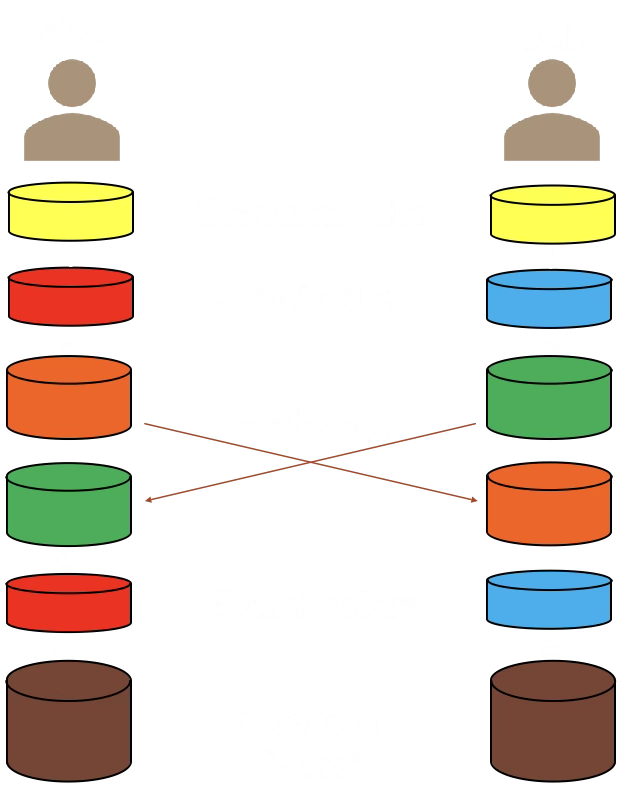
- Agree on a public "base color" (yellow), visible to everyone. This represents G, the generator value in DH.
- Each secretly chooses a private color they don't show anyone else (Alice: red, Bob: blue).
- Each mixes their private color with the public yellow to create a new mixture. This mixing represents exponentiation modulo a shared public prime P. Reversing this mixture represents solving the discrete logarithm problem.
- They exchange these mixed colors openly. Even though others see the mixed colors, they can't separate them back into the original private and public colors without knowing the exact shade of private color used.
- Each mixes the received color with their own private color. Because of the way colors mix, both final mixtures turn out to be the exact same color — a mix of Alice's red, Bob's blue, and the public yellow. This is their shared secret that nobody else can replicate.
Diffie-Hellman described as a metaphor with colors for illustration. In the real algorithm, the "colors" are very large numbers and the "mixing" is modular exponentiation — an operation that is easy to compute forward but computationally infeasible to reverse.
Key exchange security relies on a math problem that's easy in one direction but hard to reverse:
Classic Diffie-Hellman: Given a generator g and a prime p, computing gx mod p is fast. But given gx mod p, finding x is computationally infeasible for large p. This is the discrete logarithm problem.
Elliptic Curve (X25519): Instead of modular exponentiation, we use scalar multiplication on an elliptic curve. Given a base point G and a scalar x, computing x·G (adding G to itself x times on the curve) is fast. But given x·G, finding x is hard. Curve25519 was designed by Daniel J. Bernstein to be fast, safe, and resistant to implementation mistakes.
Analogy: Mixing paint colors. It's easy to mix yellow + blue to get green, but given the green, it's nearly impossible to separate it back into the original yellow and blue.
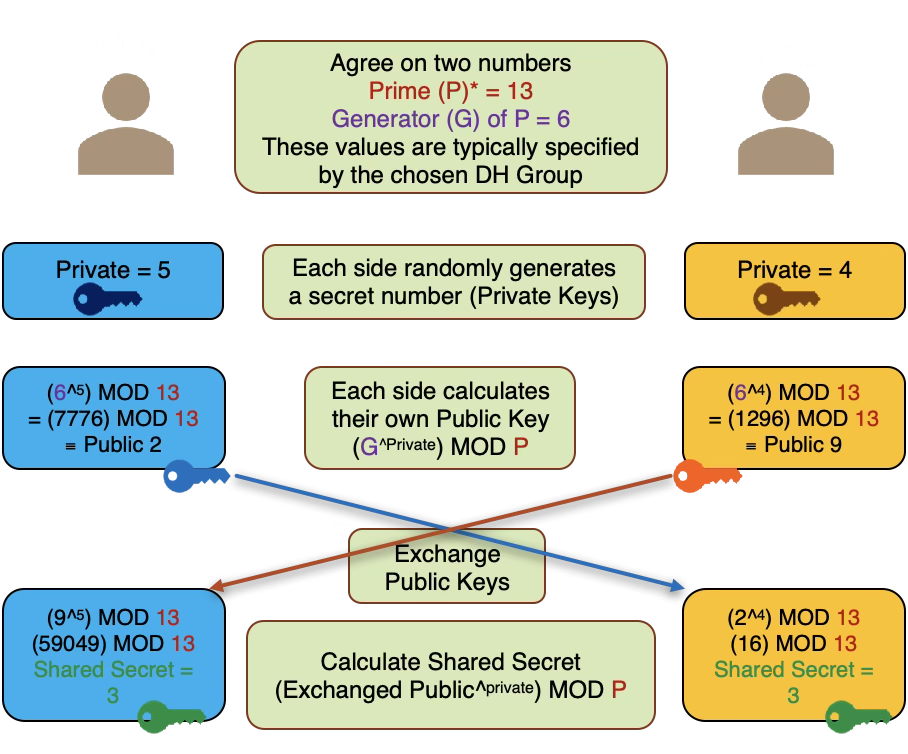
Diffie-Hellman described using very small numbers for illustration purposes. In reality, the prime (P) should be a 2048-bit or longer value, and the private keys should generally be 256-bit or longer random values.
Reversing the exponentiation modulo P operation (computing the private key from the public key) is a hard problem with no known efficient solution. This is known as the discrete logarithm problem.
Elliptic curves are defined by an equation of the form y2 = x3 + ax + b, where a and b are constants that determine the curve's shape. These curves have useful properties for cryptography:
- Horizontal symmetry: Points reflected over the x-axis remain on the curve
- All non-vertical lines intersect the curve in at most three points
Interactive visualizations (MIT licensed, by Andrea Corbellini):
- Point addition over real numbers — see how a line through two points intersects the curve at a third point
- Point addition over a finite field — see how EC arithmetic works with integer coordinates modulo p
- Scalar multiplication over a finite field — see how k * G produces a seemingly random point (the basis of ECDH/ECDSA)
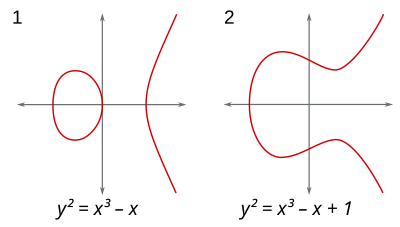
Point addition on EC over reals
ECClines-3.svg, CC BY-SA 3.0, Emmanuel Boutet
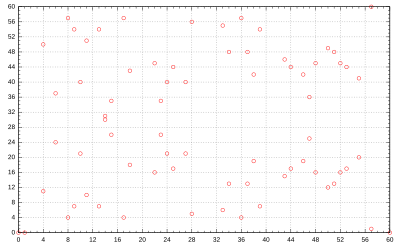
EC over finite field F61
Elliptic_curve_on_Z61.svg, CC0 Public Domain
ECC over a finite field Fp:
- p is a prime defining the field size (a square matrix p x p). Curve arithmetic wraps around at p.
- Only integer coordinates on the curve are used. n (the order) is the total number of integer points on the curve.
- In practice, p and n are 256 bits or longer, providing ~128 bits of security.
- G = generator point (a fixed base point on the curve)
- k = private key (random integer)
- P = public key (point) = k * G using EC point multiplication
Given P and G, it is computationally infeasible to determine k (compute k = P / G). This is the Elliptic Curve Discrete Logarithm Problem (ECDLP).
ECC allows much smaller keys and fewer computations to achieve equivalent security to RSA, making it particularly useful for mobile and low-power devices. ECC can be used directly for key agreement (ECDH) and signatures (ECDSA/EdDSA), but must be combined with a symmetric algorithm for encryption (hybrid scheme).
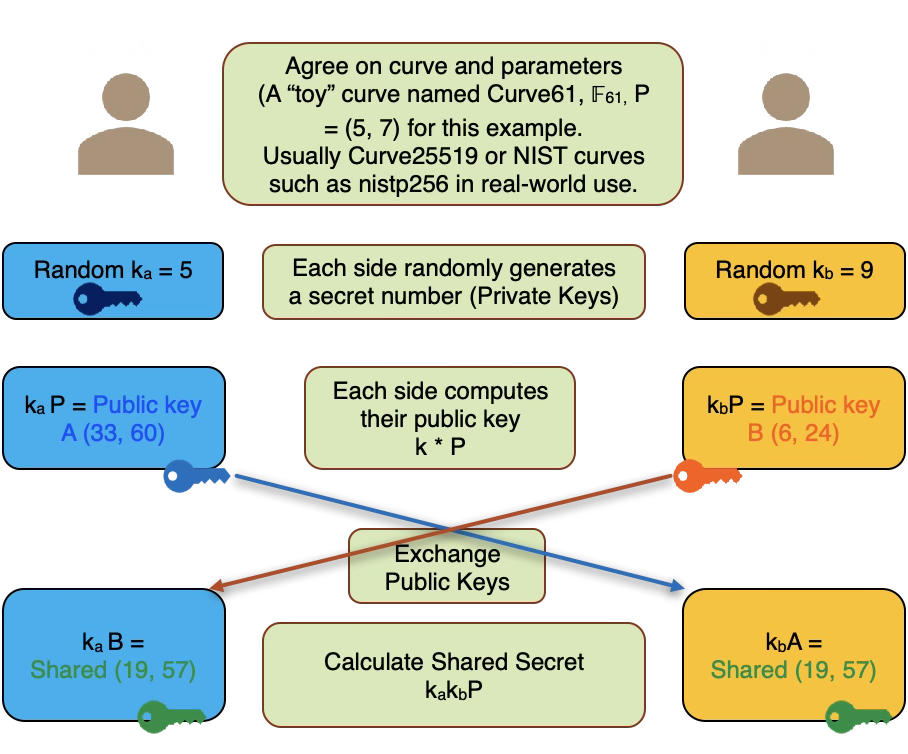
ECDH using a "toy" curve (Curve61, F61, generator P = (5, 7)) for illustration. In real-world use, Curve25519 or NIST P-256 curves with 256-bit primes are used.
Run the demo on the left, then check what an eavesdropper on the channel can see:
- Run the key exchange demo first...
- Alice's private key
- Bob's private key
- The shared secret
What Eve sees and why it doesn't help:
| What Eve captures | Why it's useless |
|---|---|
| Public parameters (G, p, curve) | These are public by design — knowing them is like knowing the rules of the game. They don't reveal any secret. |
| Alice's public key (A = ka * G) | This is the result of scalar multiplication. Recovering ka from A and G requires solving the discrete logarithm problem — computationally infeasible for 256-bit curves. |
| Bob's public key (B = kb * G) | Same problem. Eve would need kb to compute the shared secret, but extracting it from B is as hard as breaking the entire scheme. |
The core asymmetry: Computing A = ka * G is fast (polynomial time). Reversing it — finding ka given A and G — has no known efficient algorithm. The shared secret S = ka * B = kb * A = ka * kb * G requires at least one private key to compute. Eve has neither.
Even with both public keys, Eve cannot compute ka * kb * G. This is the Computational Diffie-Hellman (CDH) assumption: given G, ka*G, and kb*G, computing ka*kb*G is hard. No shortcut is known that avoids solving the discrete log first.
Basic Diffie-Hellman is vulnerable to Man-in-the-Middle attacks: an attacker who can intercept and modify messages can substitute their own public keys and establish separate shared secrets with each party.
Solution: Authenticate the public keys using digital signatures, certificates (TLS), or out-of-band verification (Signal's safety numbers). This is why key exchange is always combined with authentication in practice.
If you use ephemeral key pairs (generated fresh for each session and discarded afterward), compromising a long-term key does not reveal past session keys. This property is called forward secrecy.
TLS 1.3 requires ephemeral ECDH for every connection. Signal uses the Double Ratchet algorithm, generating new keys for every message.
Learn More
- RFC 7748 — X25519 / X448
- Signal Protocol — Double Ratchet
- RFC 8446 §7.4 — TLS 1.3 key exchange
- libsodium docs — Key exchange
Public Key Infrastructure (PKI)
This demo simulates a simplified certificate authority chain. Create a root CA, issue certificates, and verify the trust chain — the same process that makes HTTPS work.
📚 Public Key Infrastructure
PKI is the system of roles, policies, and procedures that binds public keys to identities. It's how your browser knows that the server at google.com is actually operated by Google.
Trust flows from root CAs (pre-installed in your OS/browser) through intermediate CAs to end-entity certificates (your server's cert).
- Root CA signs its own certificate (self-signed)
- Root CA signs intermediate CA certificate
- Intermediate CA signs server certificate
- Browser verifies the chain back to a trusted root
Your OS ships with ~150 trusted root certificates. Every HTTPS connection is verified against this trust store.
Certificates serve different purposes, controlled by Key Usage and Extended Key Usage extensions:
| Type | Purpose | Example |
|---|---|---|
| TLS Server (DV) | Proves a server controls a domain | Let's Encrypt cert for your website |
| TLS Server (OV/EV) | Also verifies the organization's legal identity | Bank or government website |
| TLS Client | Authenticates a client to a server (mutual TLS) | API authentication, zero-trust networks |
| Code Signing | Signs software binaries | macOS notarization, Windows Authenticode |
| S/MIME | Email encryption and signing | Digitally signed corporate email |
| CA Certificate | Signs other certificates | Root and intermediate CAs |
Domain Validation (DV) certificates only prove domain control and are the most common type (Let's Encrypt). Organization Validation (OV) and Extended Validation (EV) require additional vetting of the organization's identity, but browsers no longer display EV indicators differently from DV, reducing their perceived value.
Certificate lifetimes have shortened dramatically over the past decade, driven by security concerns:
| Year | Maximum Lifetime | Driver |
|---|---|---|
| Before 2015 | 5 years | Industry practice |
| 2015 | 3 years (39 months) | CA/Browser Forum Ballot 193 |
| 2018 | 2 years (825 days) | CA/Browser Forum Ballot 193 |
| 2020 | 398 days (~13 months) | Apple unilaterally enforced, others followed |
| 2029 | 47 days | CA/B Forum SC-081 (voted 2025, phased reduction through 2029) |
Why shorter? Shorter lifetimes reduce the window of exposure if a private key is compromised or certificate details become stale. They also force automation — manual certificate renewal doesn't scale at 47-day intervals, making ACME (Let's Encrypt) effectively mandatory.
Let's Encrypt already issues 90-day certificates and is preparing for even shorter lifetimes. Their short-lived certificates initiative explores 6-day certificates that wouldn't need revocation at all — they'd simply expire before most attacks could exploit them.
An X.509 certificate contains:
- Subject: Who the certificate identifies (e.g.,
CN=www.example.com) - Issuer: Who signed it (the CA)
- Public key: The subject's public key
- Validity period: Not-before and not-after dates
- Serial number: Unique identifier from the CA
- Signature: CA's digital signature over all the above
The signature is the critical piece: it proves the CA vouches for the binding between the subject and the public key.
If a private key is compromised, the certificate must be revoked. Two mechanisms exist:
- CRL (Certificate Revocation List): CA publishes a signed list of revoked serial numbers. Browsers download and check it periodically.
- OCSP (Online Certificate Status Protocol): Browser queries the CA in real-time for the certificate's status. OCSP Stapling lets the server fetch the response and include it in the TLS handshake, avoiding a separate round-trip.
In practice, browsers like Chrome use CRLSets — a curated, compressed list pushed via browser updates — rather than checking CRL/OCSP for every connection.
Let's Encrypt (launched 2015) revolutionized PKI by offering free, automated certificates via the ACME protocol (RFC 8555). Before it, certificates cost $50-300/year and required manual setup.
Let's Encrypt issues ~4 million certificates per day and serves over 300 million websites. Certificates are valid for 90 days and are auto-renewed, which limits exposure from key compromise.
Certificate Transparency (CT) is a system of public, append-only logs that record all issued certificates. If a CA issues a fraudulent certificate (e.g., for google.com), it will appear in CT logs and be detected.
Since 2018, Chrome requires all new certificates to include CT log entries (SCTs). You can search CT logs at crt.sh.
Learn More
- RFC 5280 — X.509 PKI specification
- RFC 8555 — ACME protocol
- Let's Encrypt — How it works
- CT documentation
- crt.sh — search CT logs
TLS 1.3 Handshake Simulation
This demo simulates a TLS 1.3 handshake with the full HKDF key schedule (RFC 8446 §7.1), transcript hashing, CertificateVerify, and Finished messages. Each step uses real cryptographic operations.
The client generates an ephemeral ECDH key pair and sends the public key along with a list of supported cipher suites and a random nonce. This message is added to the running transcript hash.
The server generates its own ephemeral ECDH key pair, selects a cipher suite, and sends its public key and server random back. Both messages are now in the transcript.
Both parties compute the ECDH shared secret, then follow the RFC 8446 §7.1 key schedule: Early Secret → Handshake Secret → handshake traffic keys. The transcript hash binds these keys to the specific handshake.
The server sends Certificate + CertificateVerify (identity proof) and a Finished message (key confirmation). The client verifies both, then sends its own Finished. Each message updates the transcript hash.
The key schedule continues: Handshake Secret → Master Secret → application traffic secrets. The full transcript (including both Finished messages) is hashed to bind these keys to the complete handshake.
The handshake is complete. Both parties now use the application traffic keys for AES-128-GCM encrypted communication. Per-record nonces are constructed by XORing a sequence number into the IV (RFC 8446 §5.3).
📚 TLS 1.3 Handshake
TLS (Transport Layer Security) is the protocol that makes HTTPS work. Every time you see the padlock in your browser, a TLS handshake has occurred. TLS 1.3 (2018) simplified the handshake from 2 round-trips to just 1 round-trip.
TLS 1.3 combines four primitives you've explored in the other tabs:
| Purpose | Primitive | Tab |
|---|---|---|
| Key exchange | ECDH (P-256 or X25519) | Key Exchange |
| Server identity | ECDSA / RSA-PSS / Ed25519 | Signatures |
| Bulk encryption | AES-128-GCM or ChaCha20-Poly1305 | Symmetric |
| Key derivation | HKDF-Extract + Expand-Label | KDF |
| Key confirmation | HMAC-SHA-256 (Finished) | Hashing |
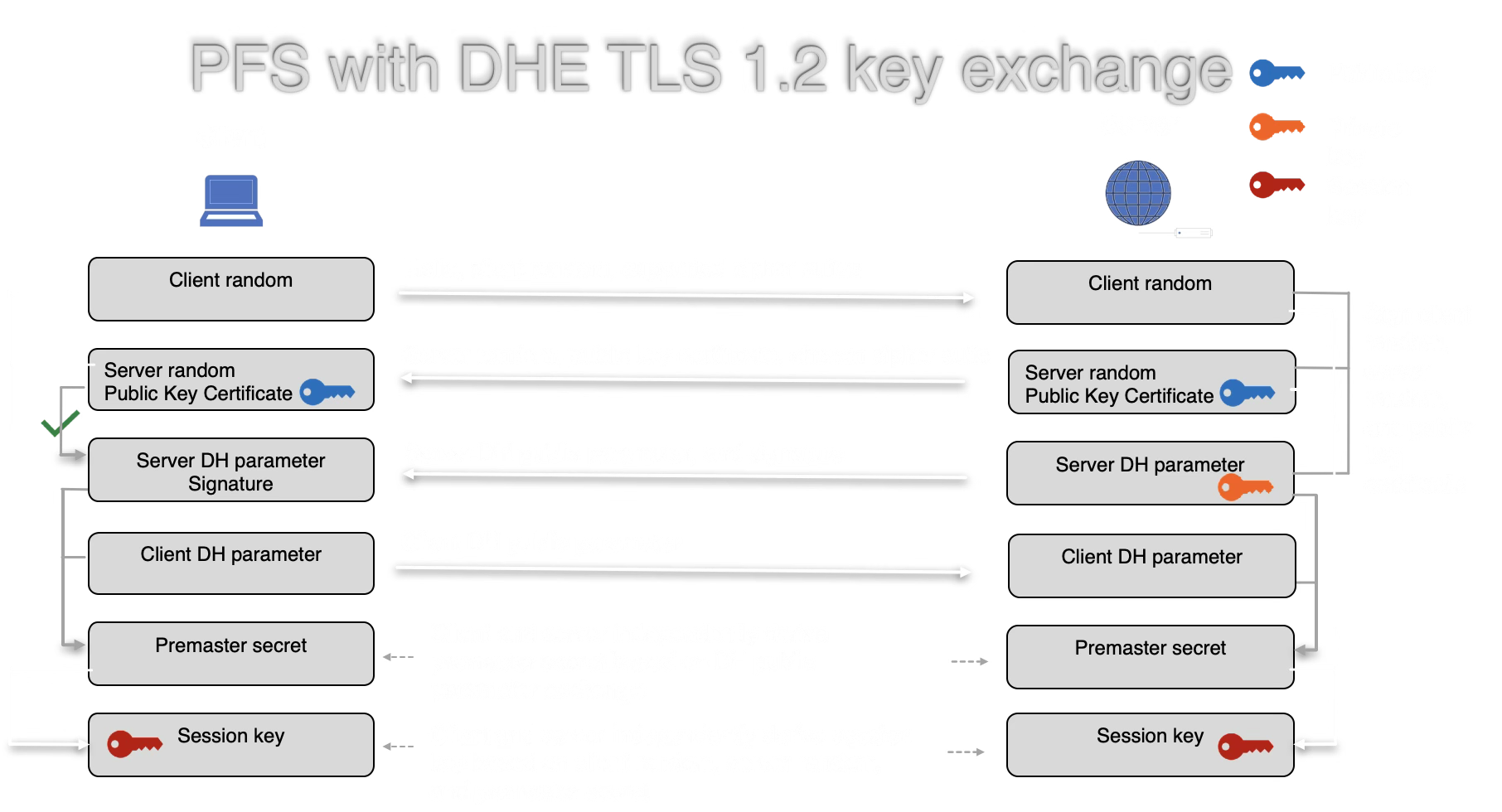
| TLS 1.2 | TLS 1.3 | |
|---|---|---|
| Round trips | 2 | 1 |
| Key exchange | RSA or ECDH | ECDH only |
| Forward secrecy | Optional | Required |
| Ciphers | Many (some weak) | 5 strong suites |
| 0-RTT resumption | No | Yes |
TLS 1.3 removed RSA key exchange entirely — ensuring forward secrecy for all connections. If a server's long-term key is compromised, past sessions remain secure because ephemeral ECDH keys were used and discarded.
TLS 1.2 with DHE (2 round trips):
TLS 1.3 with ECDHE (1 round trip):
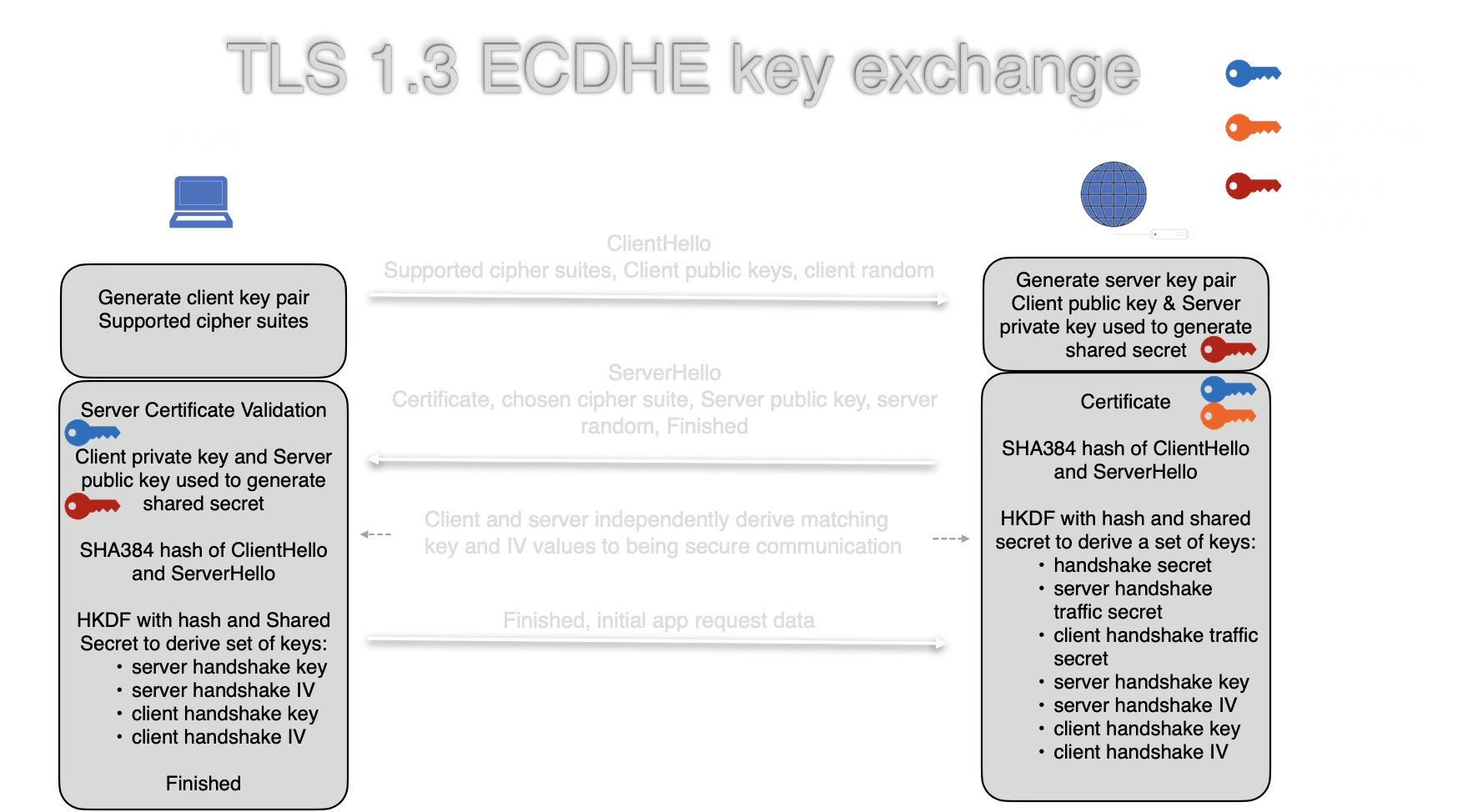
TLS 1.3 combines the key share into the ClientHello, eliminating a full round trip. Both sides independently derive handshake keys, traffic secrets, and IVs via HKDF using the shared secret and transcript hash.
In this demo, both parties generate ephemeral ECDH keys — used once and discarded. Even if the server's long-term signing key is stolen tomorrow, an attacker cannot:
- Decrypt previously recorded traffic (the ephemeral keys are gone)
- Forge future connections (they still need to complete a new ECDH exchange)
The signing key only proves identity — it is never used for encryption. This separation of concerns is a core design principle of TLS 1.3.
TLS 1.3 supports only 5 cipher suites (compared to dozens in TLS 1.2):
TLS_AES_128_GCM_SHA256TLS_AES_256_GCM_SHA384TLS_CHACHA20_POLY1305_SHA256TLS_AES_128_CCM_SHA256TLS_AES_128_CCM_8_SHA256
This demo simulates TLS_AES_128_GCM_SHA256 with ECDH P-256 — the most widely used combination.
This demo implements the full HKDF key schedule, transcript hashing, and Finished messages. Remaining simplifications:
- Certificate chains: Real servers present a chain of certificates back to a trusted root CA; this demo uses a self-signed key
- EncryptedExtensions: Server parameters sent after ServerHello (omitted for clarity)
- 0-RTT resumption: Pre-shared keys allow data in the first flight
- Resumption secret: Derived from Master Secret for session tickets
- Encrypted handshake: Steps 4's messages would be encrypted with handshake traffic keys in a real connection
Learn More
- RFC 8446 — TLS 1.3 specification
- tls13.xargs.org — Byte-by-byte TLS 1.3 walkthrough
- Cloudflare blog — TLS 1.3 explained
- MDN TLS guide
Signal Protocol
The Signal Protocol (used in Signal, WhatsApp, and Google Messages) provides end-to-end encrypted messaging with forward secrecy and post-compromise security. This simulation demonstrates the protocol structure using real cryptographic operations.
📚 Signal Protocol
Designed by Moxie Marlinspike and Trevor Perrin, the Signal Protocol is widely considered the gold standard for end-to-end encrypted messaging.
- Forward secrecy: Compromising current keys cannot decrypt past messages
- Post-compromise security: After a key compromise, security is restored once a new DH ratchet step occurs
- Asynchronous setup: X3DH allows messaging without both parties being online
- Out-of-order delivery: Messages can arrive in any order
- Deniability: Messages cannot be cryptographically attributed to a sender by a third party
Signal's safety numbers let users verify they're not subject to a man-in-the-middle attack. The real process:
- Take each party's identity public key (32 bytes for Curve25519)
- Concatenate: version byte (0x00) + user phone number hash + identity key
- Iterate SHA-512 5200 times per party
- Take the first 30 bytes of each final hash, convert to 30 decimal digits
- Concatenate both parties' 30 digits → 60-digit safety number
- Display as 12 groups of 5 digits, or encode as a QR code
This demo implements the full algorithm: X25519 identity keys, 5200 SHA-512 iterations per party, 5-byte chunks mod 100000, producing 60 digits in 12 groups of 5. If either party's identity key changes (new device, reinstall), the safety number changes and Signal displays a warning.
- Signal — the reference implementation
- WhatsApp — 2+ billion users since 2016
- Google Messages — RCS encryption
- Facebook Messenger — default E2EE since 2023
- Skype — "Private Conversations" mode
Learn More
Bitcoin Cryptography
Bitcoin uses a small set of well-understood cryptographic primitives. Every transaction, address, and block relies on the same building blocks you've explored in the other tabs.
| Component | Primitive | Purpose |
|---|---|---|
| Addresses | SHA-256 + RIPEMD-160 | Hash public key to create a short address |
| Transactions | ECDSA (secp256k1) | Sign transactions to prove ownership of funds |
| Blocks | Double SHA-256 | Block header hash for proof-of-work |
| Merkle tree | SHA-256 | Efficiently verify transaction inclusion |
| Key derivation | HMAC-SHA512 | HD wallet key derivation (BIP-32) |
| Taproot (2021) | Schnorr signatures (BIP-340) | More efficient and private multi-sig |
When Alice sends Bitcoin to Bob:
- Construct transaction: Reference previous outputs (UTXOs), specify Bob's address, set amount
- Hash the transaction: Double SHA-256 of the serialized transaction data
- Sign with ECDSA: Sign the hash with Alice's private key (secp256k1 curve)
- Broadcast: Transaction + signature sent to the network
- Verify: Every node verifies the signature against Alice's public key
signature = ECDSA_sign(alice_private_key, tx_hash)
// Every node verifies:
valid = ECDSA_verify(alice_public_key, tx_hash, signature)
A Bitcoin address is derived from a public key through multiple hash steps:
2. public_key = private_key * G (secp256k1 point multiplication)
3. hash1 = SHA256(public_key)
4. hash2 = RIPEMD160(hash1) (= 20-byte pubkey hash)
5. address = Base58Check(version_byte + hash2)
The one-way nature of SHA-256 and RIPEMD-160 means you cannot derive the public key from an address, and you cannot derive the private key from the public key (elliptic curve discrete log problem).
Mining is a brute-force search for a nonce that makes the block header hash start with a required number of zero bits:
for nonce = 0, 1, 2, ...:
header = prev_hash + merkle_root + timestamp + nonce
hash = SHA256(SHA256(header))
if hash < target: // target sets difficulty
block found!
This works because SHA-256 is a random oracle — the only way to find a hash below the target is to try many nonces. The difficulty adjusts every 2016 blocks (~2 weeks) so blocks are found approximately every 10 minutes.
📚 Bitcoin Cryptography
Bitcoin's security model relies on standard, well-tested cryptographic primitives — not novel cryptography. Satoshi Nakamoto's innovation was combining them into a trustless consensus system.
Bitcoin uses the secp256k1 elliptic curve (y2 = x3 + 7 over a 256-bit prime field), chosen by Satoshi because it was an underused curve with no suspicious constants — reducing the risk of a backdoor.
The ECDSA tab in this workbench uses P-256 (NIST's standard curve). secp256k1 provides equivalent security but with different performance characteristics. Note: this workbench cannot demonstrate secp256k1 directly because Web Crypto API only supports NIST curves.
The Taproot upgrade (2021) introduced Schnorr signatures (BIP-340) alongside ECDSA:
- Linearity: Multiple signatures can be aggregated into one (MuSig2), making multi-sig transactions indistinguishable from single-sig
- Privacy: Complex spending conditions are hidden until used
- Efficiency: Batch verification is faster than ECDSA
A sufficiently powerful quantum computer running Shor's algorithm could break secp256k1 ECDSA and recover private keys from public keys. However:
- Addresses that haven't spent (public key not exposed) are protected by the hash layer (SHA-256 + RIPEMD-160)
- Grover's algorithm only halves the security of SHA-256 (128 bits remains secure)
- Migration to post-quantum signatures (see PQC tab) is being actively researched
Learn More
- Bitcoin whitepaper — Satoshi Nakamoto
- Mastering Bitcoin — Andreas Antonopoulos
- secp256k1 on Bitcoin Wiki
- BIP-340 — Schnorr signatures
Post-Quantum Cryptography
Quantum computers threaten current public-key cryptography. NIST finalized the first post-quantum standards in 2024. This page explains the threat, the new algorithms, and the transition timeline.
Shor's algorithm (1994) can efficiently factor large integers and compute discrete logarithms on a quantum computer. This breaks:
| Algorithm | Used In | Broken By |
|---|---|---|
| RSA | TLS, S/MIME, code signing | Integer factorization → Shor's |
| ECDSA / ECDH | TLS, Bitcoin, Signal | Discrete log on EC → Shor's |
| DH / DSA | Legacy protocols | Discrete log → Shor's |
| AES-256 | Symmetric encryption | Grover's halves security to 128 bits — still safe |
| SHA-256 | Hashing | Grover's halves preimage security — still safe |
Key point: Only asymmetric algorithms are threatened. Symmetric encryption and hashing remain secure with doubled key/output sizes. The concern is "harvest now, decrypt later" — adversaries recording encrypted traffic today to decrypt once quantum computers arrive.
After an 8-year public competition, NIST standardized three algorithms in August 2024:
ML-KEM (FIPS 203) — Key Encapsulation
Formerly "Kyber." Based on the Module Learning With Errors (MLWE) problem on lattices. Replaces ECDH key exchange.
| Parameter Set | Security | Public Key | Ciphertext |
|---|---|---|---|
| ML-KEM-512 | 128-bit (NIST Level 1) | 800 bytes | 768 bytes |
| ML-KEM-768 | 192-bit (NIST Level 3) | 1,184 bytes | 1,088 bytes |
| ML-KEM-1024 | 256-bit (NIST Level 5) | 1,568 bytes | 1,568 bytes |
ML-DSA (FIPS 204) — Digital Signatures
Formerly "Dilithium." Also lattice-based (MLWE + MSIS). Replaces ECDSA/Ed25519 signatures.
| Parameter Set | Security | Public Key | Signature |
|---|---|---|---|
| ML-DSA-44 | 128-bit (Level 2) | 1,312 bytes | 2,420 bytes |
| ML-DSA-65 | 192-bit (Level 3) | 1,952 bytes | 3,309 bytes |
| ML-DSA-87 | 256-bit (Level 5) | 2,592 bytes | 4,627 bytes |
SLH-DSA (FIPS 205) — Stateless Hash-Based Signatures
Formerly "SPHINCS+." Based entirely on hash functions (no lattices). Larger signatures but relies on minimal assumptions — only the security of the hash function.
Public keys: 32-64 bytes. Signatures: 7,856-49,856 bytes depending on parameter set. Intended as a conservative fallback if lattice-based schemes are broken.
The Learning With Errors (LWE) problem: given a system of approximate linear equations over a finite field, recover the secret vector. The "errors" (small random noise) make this computationally hard — even for quantum computers.
// Given public matrix A and vector b = A*s + e
// where s is the secret and e is small noise,
// find s.
b1 = 14*s1 + 7*s2 + 9*s3 + 2 (error = 2)
b2 = 3*s1 + 12*s2 + 5*s3 + -1 (error = -1)
b3 = 8*s1 + 2*s2 + 11*s3 + 3 (error = 3)
Without the errors, this is ordinary linear algebra (easy). With small errors, it becomes a hard lattice problem. ML-KEM works over modules of polynomial rings for efficiency — hence "Module-LWE."
Intuition: Imagine trying to solve a system of equations where every answer is slightly wrong. A few equations, you can brute-force. Thousands of equations with noise in a high-dimensional lattice — no known efficient algorithm, classical or quantum.
| Operation | Classical | Size | Post-Quantum | Size |
|---|---|---|---|---|
| Key exchange pub key | X25519 | 32 B | ML-KEM-768 | 1,184 B |
| Key exchange ciphertext | X25519 | 32 B | ML-KEM-768 | 1,088 B |
| Signature pub key | Ed25519 | 32 B | ML-DSA-65 | 1,952 B |
| Signature | Ed25519 | 64 B | ML-DSA-65 | 3,309 B |
PQC keys and signatures are 30-50x larger than classical equivalents. This has real implications for TLS handshake sizes, certificate chains, and bandwidth-constrained protocols like IoT.
- 2024: NIST publishes FIPS 203/204/205
- 2024-2025: Chrome and Firefox ship hybrid key exchange (X25519 + ML-KEM-768) in TLS 1.3
- 2025: NSA CNSA 2.0 requires ML-KEM for national security systems
- 2030: NIST target for deprecating classical-only key exchange
- 2035: NIST target for deprecating classical-only signatures
Generate real classical keys, then compare their sizes to PQC equivalents.
Simulate a hybrid key exchange like Chrome's TLS 1.3 implementation: combine a real X25519 exchange with a simulated ML-KEM-768 encapsulation, then derive the final shared secret from both via HKDF.
The security of ML-KEM relies on hard lattice problems. Below is a 2D lattice — click the canvas to place a target point, and try to find the closest lattice point. In 2D this is easy; in 500+ dimensions, it's computationally infeasible even for quantum computers.
An adversary records encrypted traffic today, hoping to decrypt it once quantum computers arrive. How urgent is the PQC transition for your data?
📚 Post-Quantum Cryptography
PQC algorithms are designed to resist both classical and quantum attacks. The transition is happening now — Chrome already uses hybrid PQC key exchange for most HTTPS connections.
- Lattice-based: ML-KEM, ML-DSA. Fast, compact, well-studied. Most deployed PQC algorithms.
- Hash-based: SLH-DSA, XMSS, LMS. Minimal assumptions (only hash security). Conservative fallback.
- Code-based: Classic McEliece (under evaluation). Very large keys but decades of cryptanalysis.
- Isogeny-based: SIKE was broken in 2022 by a classical attack. This family is largely abandoned.
- Multivariate: Under research. Not yet standardized.
Current deployments use hybrid key exchange: combine a classical algorithm (X25519) with a PQC algorithm (ML-KEM-768). The shared secret is derived from both.
This ensures that if either algorithm is broken (ML-KEM by new cryptanalysis, or X25519 by quantum computers), the connection remains secure. Chrome ships this as X25519Kyber768Draft in TLS 1.3.
The trade-off: TLS ClientHello grows from ~256 bytes to ~1,400 bytes. Measurable but acceptable for most connections.
Estimates vary widely. Breaking RSA-2048 requires ~4,000 error-corrected logical qubits. Current quantum computers have ~1,000-1,500 noisy physical qubits.
Most experts estimate 2030-2040 for cryptographically relevant quantum computers. The "harvest now, decrypt later" threat means we need to deploy PQC for key exchange before quantum computers arrive, even if that's a decade away.
Learn More
- NIST PQC project
- FIPS 203 — ML-KEM standard
- FIPS 204 — ML-DSA standard
- pq-crystals.org — Kyber/Dilithium reference
- Cloudflare PQC deployment
Shamir Secret Sharing
Split a secret into multiple shares so that only a threshold number of shares can reconstruct it. No single share reveals any information about the secret.
Paste shares below (one per line, in hex or base64 format). You need at least k shares to recover the secret.
After splitting, try reconstructing with fewer than the threshold number of shares. The reconstruction will fail or produce garbage — demonstrating that k-1 shares reveal nothing about the secret.
📚 Shamir Secret Sharing
Invented by Adi Shamir in 1979, this scheme splits a secret into n shares such that any k shares can reconstruct the secret, but k-1 shares reveal nothing — not even a single bit.
The secret is encoded as the constant term of a random polynomial of degree k-1 over a finite field:
Each share is a point (xi, f(xi)) on this polynomial. Given k points, Lagrange interpolation uniquely determines the polynomial and recovers f(0) = secret. With fewer than k points, infinitely many polynomials fit — so no information about the secret leaks.
Example (k=2): Two points define a line. If you know one point, the line could have any slope — the y-intercept (secret) could be anything. With two points, there's exactly one line.
- HashiCorp Vault / OpenBao: Master key is split into shares during initialization. A quorum of key holders must provide shares to unseal the vault.
- Cryptocurrency wallets: Split seed phrases across multiple secure locations so no single breach compromises funds.
- Key escrow: Corporate key recovery where multiple officers must cooperate.
- DNSSEC root key ceremonies: The ICANN root KSK is protected by 14 trusted community representatives, 5 of whom must be present.
- Multi-party computation: Foundation for more complex secret sharing protocols.
| Shamir SSS | Multi-Sig | |
|---|---|---|
| Secret exists | Only during split/reconstruct | Never assembled |
| Trust model | Reconstructor sees secret | No single party sees key |
| Flexibility | Any k-of-n threshold | Algorithm-specific |
| Example | Vault unseal | Bitcoin multi-sig |
Learn More
- Wikipedia: Shamir's Secret Sharing
- OpenBao — open-source vault using SSS
- Vault Seal/Unseal — SSS in practice
- Proactive Secret Sharing — refresh shares without reconstructing
Key Derivation Functions
KDFs are the bridge between raw key material (a DH shared secret, a password, or existing key) and usable cryptographic keys. They extract entropy and expand it into keys of the required length.
Derive multiple keys from the same input by changing the "info" parameter. This is how TLS derives separate client/server keys from one shared secret.
📚 Key Derivation
A KDF takes input key material (which may have uneven entropy distribution) and produces uniformly random output suitable for use as cryptographic keys.
HKDF (RFC 5869) operates in two stages:
- Extract:
PRK = HMAC-Hash(salt, IKM)— compresses the input key material into a fixed-length pseudorandom key, even if the input has non-uniform entropy. - Expand:
OKM = HMAC-Hash(PRK, info || counter)— expands the PRK into as many bytes as needed, using the "info" parameter for domain separation.
The info parameter is critical: it ensures that keys derived for different purposes (encryption vs authentication) are cryptographically independent, even from the same input.
| KDF | Input | Used In |
|---|---|---|
| HKDF | High-entropy (DH output, random key) | TLS 1.3, Signal, WireGuard |
| PBKDF2 | Low-entropy (passwords) | Wi-Fi WPA2, disk encryption |
| Argon2 | Low-entropy (passwords) | Password storage |
| scrypt | Low-entropy (passwords) | Cryptocurrency wallets |
Learn More
- RFC 5869 — HKDF specification
- MDN SubtleCrypto.deriveKey()
TOTP / HOTP — One-Time Passwords
Generate time-based and counter-based one-time passwords — the same codes your authenticator app produces. Built entirely on HMAC.
📚 One-Time Passwords
TOTP and HOTP turn HMAC into one-time passwords. Every authenticator app (Google Authenticator, Authy, 1Password) uses this exact algorithm.
- Shared secret is established during setup (the QR code you scan)
- Counter = floor(unix_time / 30) — changes every 30 seconds
- HMAC:
hash = HMAC-SHA1(secret, counter) - Truncate: Extract 4 bytes from the hash at a dynamic offset
- Modulo:
code = truncated_value mod 10^digits
HOTP (RFC 4226) is identical but uses a monotonically increasing counter instead of time. TOTP (RFC 6238) builds on HOTP by using time as the counter.
- Phishing vulnerable: TOTP codes can be relayed in real-time by an attacker (unlike FIDO2/WebAuthn)
- Secret compromise: If the shared secret is stolen, all future codes are computable
- Time sync: Server typically accepts codes within a window (e.g., +-1 period) to handle clock drift
- Prefer FIDO2: Hardware security keys (WebAuthn) are phishing-resistant and should be preferred over TOTP where possible
Learn More
JSON Web Tokens (JWT)
Create, inspect, and verify JWTs — the token format used in OAuth, OpenID Connect, and API authentication. See how the signature prevents tampering.
📚 JSON Web Tokens
A JWT is three Base64url-encoded parts separated by dots: header.payload.signature. The signature prevents tampering but the payload is not encrypted — anyone can decode it.
Header: {"alg": "HS256", "typ": "JWT"} — specifies the signing algorithm.
Payload: Contains claims (sub, iat, exp, custom data). Visible to anyone — never put secrets here.
Signature: HMAC-SHA256(base64url(header) + "." + base64url(payload), secret) — proves the token hasn't been modified and was issued by someone with the secret.
- "alg": "none" — Attacker sets algorithm to "none" and removes signature. Server must reject unsigned tokens.
- Algorithm confusion: Server expects RS256 (RSA) but attacker sends HS256 using the public key as HMAC secret. Server must enforce expected algorithm.
- Weak secrets: HS256 with a short/guessable secret allows brute-force. Use 256+ bit random secrets.
- Missing expiry: Tokens without
expclaim live forever if stolen.
Learn More
- RFC 7519 — JWT specification
- jwt.io — JWT debugger
- OWASP JWT Cheat Sheet
Merkle Trees
Build a hash tree interactively and see how changing one leaf changes the root. Merkle trees efficiently verify data integrity — used in Git, Bitcoin, certificate transparency, and IPFS.
Add new blocks and watch the tree grow — new levels are created as needed. The previous root becomes just one branch of the new tree.
After building, change one character in any data block and rebuild. Only the hashes on the path from that leaf to the root change — but the root hash is completely different.
📚 Merkle Trees
A Merkle tree (hash tree) is a binary tree where each leaf is a hash of a data block and each internal node is a hash of its two children. The root hash is a fingerprint of all the data.
- Hash each data block individually:
H(block) - Pair adjacent hashes and hash each pair:
H(H1 + H2) - Repeat until one hash remains — the Merkle root
Merkle proofs: To prove a block is in the tree, you only need log2(n) hashes (the sibling at each level). For 1 million blocks, that's just 20 hashes — not all million.
- Bitcoin: Each block header contains the Merkle root of all transactions. SPV (light) clients verify transactions without downloading the full block.
- Git: Every commit is a hash tree of files. Changing one file changes all hashes up to the commit ID.
- Certificate Transparency: CT logs are append-only Merkle trees of certificates.
- IPFS: Content-addressed storage using Merkle DAGs.
- AWS S3: Uses Merkle trees for data integrity verification.
Learn More
Zero-Knowledge Proofs
This demo illustrates a cryptographic commitment scheme — a building block used in zero-knowledge proofs. The prover commits to a value, then later reveals it for verification. A full ZKP (like Schnorr's protocol) would prove knowledge without revealing the secret; this demo shows the commitment mechanism that underlies such protocols.
The prover commits to a secret by publishing its hash. The verifier challenges the prover to demonstrate knowledge without seeing the secret itself.
This is a real zero-knowledge proof. A cave has a ring-shaped tunnel with a locked door in the middle. The prover claims to know the door's secret. The verifier challenges them repeatedly — after enough rounds, a faker is statistically impossible.
Unlike the commitment scheme above, the verifier never learns the secret.
📚 Zero-Knowledge Proofs
A zero-knowledge proof lets a prover convince a verifier that a statement is true without revealing any information beyond the validity of the statement itself.
- Completeness: If the statement is true and both parties are honest, the verifier will be convinced.
- Soundness: If the statement is false, no cheating prover can convince the verifier (except with negligible probability).
- Zero-knowledge: The verifier learns nothing beyond the fact that the statement is true. The interaction could be simulated without the prover.
- Interactive: Prover and verifier exchange messages (like this demo). Requires real-time interaction.
- Non-interactive (NIZK): Prover publishes a single proof anyone can verify. Uses the Fiat-Shamir heuristic to replace interaction with a hash.
- zk-SNARKs: Succinct non-interactive proofs. Small, fast to verify. Used in Zcash and Ethereum rollups.
- zk-STARKs: Transparent (no trusted setup), post-quantum secure, but larger proofs. Used in StarkNet.
The Schnorr protocol (1989) is the simplest practical ZKP. It proves knowledge of a discrete logarithm — the same hard problem underlying Diffie-Hellman and ECDSA.
Setup
Public parameters: prime p, generator g, prover's public key y = gx mod p where x is the secret.
Protocol (3 moves)
2. Challenge: Verifier sends random c
3. Response: Prover sends s = k - c*x mod (p-1)
Verify: Check gs * yc mod p == r
Why it works:
gs * yc = g(k - cx) * g(cx) = gk = r ✓
Why it's zero-knowledge:
The verifier sees (r, c, s) but cannot extract x.
Given any (r, c), a simulator can produce a valid s
without knowing x, so the transcript reveals nothing.
Code Example
Fiat-Shamir Heuristic (Non-Interactive)
To make it non-interactive, replace the verifier's random challenge with a hash: c = H(g || y || r). The prover computes everything locally and publishes (r, s) as the proof. Anyone can verify without interaction.
This is the basis of Schnorr signatures (used in Bitcoin Taproot/BIP-340) and the foundation of zk-SNARKs (which generalize to arbitrary computations).
| Commitment Scheme | Zero-Knowledge Proof | |
|---|---|---|
| Verifier learns secret? | Yes (during opening) | No |
| Binding? | Yes — can't change after commit | Yes — prover can't lie |
| Hiding? | Yes — before opening | Yes — always |
| Example | H(secret || blind) | Schnorr protocol, cave analogy |
| Use case | Sealed-bid auctions, coin flips | Authentication, blockchain privacy |
The commitment scheme demo above shows the binding property. The cave simulation shows a true ZKP where the verifier becomes convinced without ever learning the secret.
- Zcash: zk-SNARKs hide sender, receiver, and amount in transactions
- Ethereum L2 rollups: zk-rollups (zkSync, StarkNet) prove thousands of transactions are valid without re-executing them
- Identity: Prove you're over 18 without revealing your birthdate
- Authentication: Prove you know a password without transmitting it (SRP protocol)
- Voting: Prove your vote is valid without revealing who you voted for
Learn More
- Wikipedia: Zero-Knowledge Proof
- zkp.science — curated ZKP resources
- Zcash: What are zk-SNARKs?